

Settings
Zabbix connection test, host group allowlist, field masking mode, switching off write actions per role, separation of duties, version updates and content packs. Changes apply as soon as they are saved. Available in every edition; separation of duties needs Enterprise.
Settings holds the gateway's own runtime configuration; only administrators can change it. Changes on this page apply as soon as they are saved, with no gateway restart, and take precedence over the same settings in .env; see the configuration reference. The tabs at the top of the page also hold Users, AI settings and License.
The audit switch and forwarding addresses are on the Audit forwarding tab of Outbound channels.
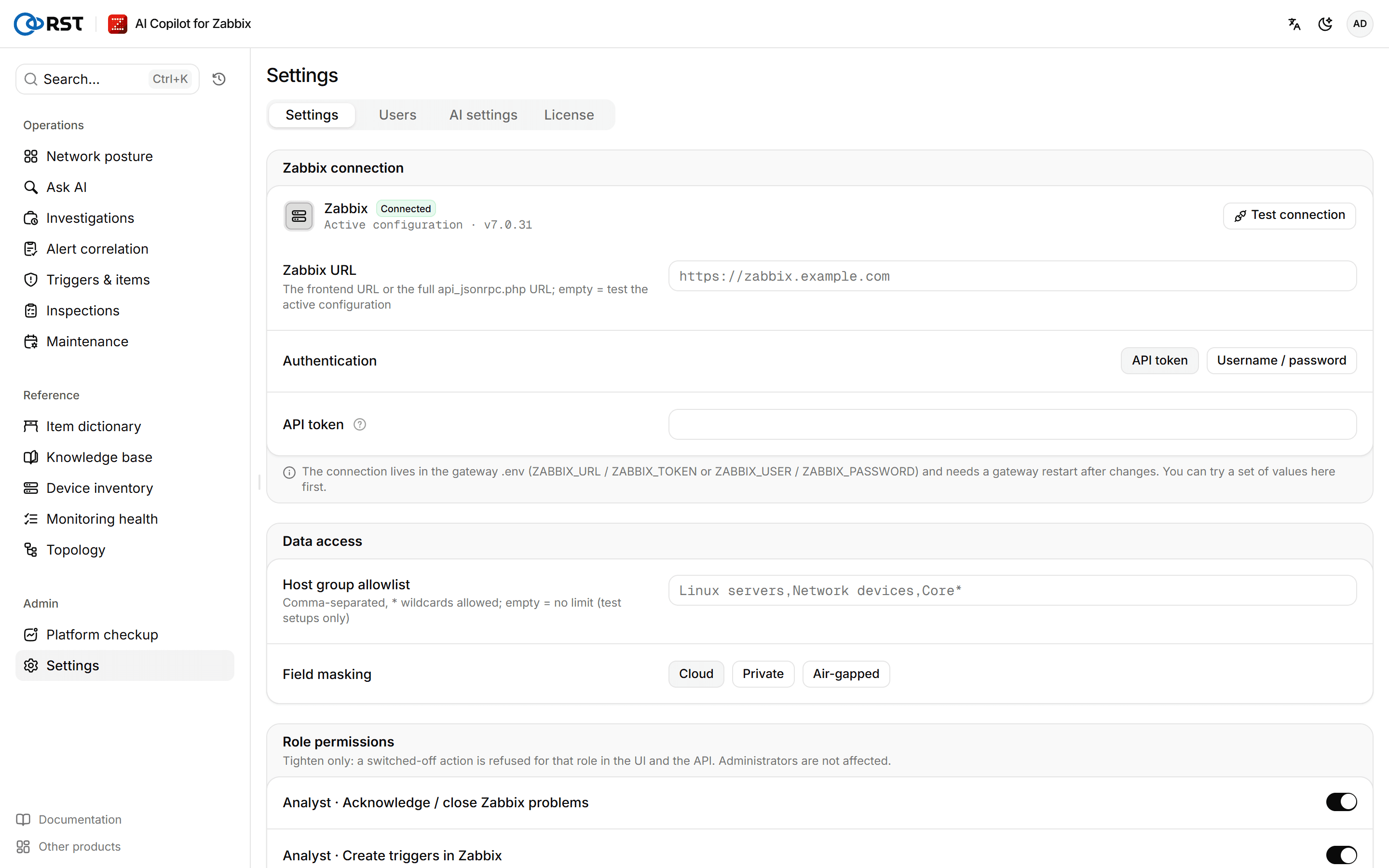
Test the Zabbix connection
The Zabbix connection is set in the gateway's .env: ZABBIX_URL, plus either ZABBIX_TOKEN or ZABBIX_USER and ZABBIX_PASSWORD. Changing it needs a gateway restart. Use this page to try a set of parameters before you change them, or to check the active configuration.
Prerequisites
- The administrator role.
- Zabbix 6.0, 6.4, 7.0, 7.2 or 7.4.
- A Zabbix API token or a Zabbix account. For the permissions it needs, see Zabbix permissions.
Steps
- Under Zabbix connection, enter the Zabbix URL: the frontend URL or the full
api_jsonrpc.phpURL. Leave it empty to test the active configuration. - Pick the Authentication:
- API token: create one in Zabbix 6.0 or later under User settings → API tokens. A token for a read-only account is recommended.
- Username / password: enter the Username and Password.
- Select Test connection.
On success the page shows Connected · Zabbix and the version; on failure it shows the reason. The test reports the kind of error only, never the text Zabbix sent back.
Once the test passes, put the parameters in .env and restart the gateway; see Deploy.
Set the data scope and masking
Steps
- Under Data access, enter the Host group allowlist: comma-separated host group names,
*wildcards allowed. Leave it empty for no limit, which is only advisable on test systems. - Pick the Field masking mode: Cloud, Private or Air-gapped.
- Select Save and apply.
The allowlist applies to every role; objects outside it are reported as not found. All three masking modes are available in every edition. What each mode does is described in AI settings.
Switch off write actions per role
Role permissions under Permissions switches off a role's write actions in Zabbix, or AI analysis for the read-only role. It can only tighten permissions, never widen them. A switched-off action is refused for that role in the UI and the API. Administrators are not affected.
| Role | Actions you can switch off |
|---|---|
| Analyst | Acknowledge / close Zabbix problems, Create triggers in Zabbix, Create maintenance windows, Remote ping / traceroute |
| Viewer | Use AI analysis (investigate, explain, triage) |
Steps
- Under Role permissions, turn off the switch for the action.
- Select Save and apply.
The change applies immediately, with no re-login. For each role's full permissions, see Users.
Turn on separation of duties
Separation of duties is an Enterprise feature. When it is on, only auditors can read the audit log; administrators cannot. Changing the switch is itself audited.
Prerequisites
- An Enterprise license, including a trial.
- An auditor account already exists; otherwise nobody can read the audit log once the switch is on.
Steps
- Under Permissions, turn on Separation of duties.
- Select Save and apply.
If the deployment sets RST_SEPARATION_OF_DUTIES in the environment, the switch is pinned on and cannot be turned off here. To turn it off, change that variable in the deployment configuration and restart the gateway.
Update the gateway
Online update under Version and updates shows the Current version. The gateway checks for a new release once a day on its own, and you can check by hand at any time.
Steps
- (Optional) Select Check now. When a release is available, the page shows it.
- Select Download and stage. The gateway downloads the new image and verifies its signature; the status becomes Staged.
- An operator runs
./rst-update.shon the host to install it; see Upgrade, rollback and backup.
The gateway checks GitHub Releases, so the host needs access to GitHub. Hosts without internet access upgrade with the offline bundle. Deployments activated offline skip the online check.
Import a content pack
A content pack is a signed update of prompts and templates that needs no gateway upgrade. When the daily update check finds a newer content pack, it is imported and applied automatically. With RST_CONTENT_AUTO_APPLY=0 in the gateway environment it is only downloaded and kept; switch to it under Roll back when you want it. Offline hosts import packs by hand as below.
Steps
- Under Import a content pack in Content pack, paste the content pack token.
- Select Verify and import. A bad signature or an older version is refused.
Active version shows the content pack in use, or Built-in defaults if none was imported. To go back, pick a version saved on this host under Roll back and select Roll back to this version.
Platform checkup
A check-up of Zabbix itself: version, self-monitoring data, monitoring queue, process busy, cache usage, HA nodes, proxy status and unsupported items. The AI read groups failing checks by cause and orders the fixes. Professional and above.
Users
Accounts for the gateway's own login and their four roles. Create, change roles, disable, reset passwords and delete; the auditor role and separation of duties. Community has 1 user, Professional is per seat, the auditor role needs Enterprise.