

UI overview
The sidebar groups and in-page tabs, the command palette, the account menu and roles, and global banners.
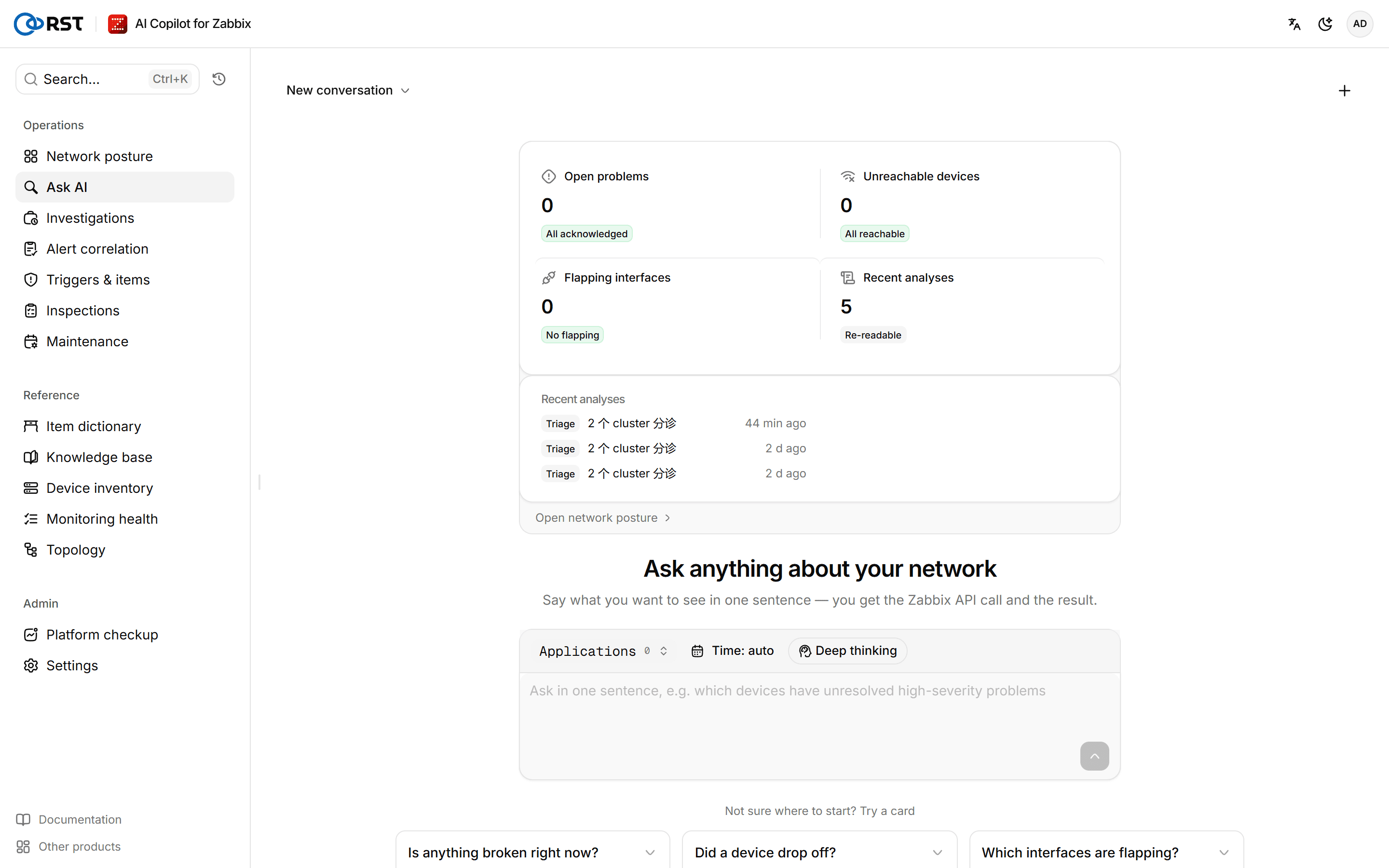
The interface is at https://<hostname>/v2/. The first account is the administrator set during installation. There is no self-registration; add other accounts on the Users page. Community Edition has one account; when all seats are in use, creating or enabling an account opens an upgrade dialog. If the license lapses or is replaced by one with fewer seats while more accounts are enabled, only administrators can sign in; accounts and data are kept. On first sign-in, each account must accept the current version of the end-user license agreement, and again whenever the agreement version changes. After sign-in, the Ask AI home page opens.
Pages
The sidebar has two groups, Operations and Reference, with Platform checkup and Settings pinned at the bottom. Network posture, Investigations, Platform checkup and Settings carry tabs at the top that hold eight more pages. Pages that need a paid license show a lock in the navigation; you can open one and look around, with a sample result, and running it opens an upgrade dialog.
| Group | Page | Content | Tabs |
|---|---|---|---|
| Operations | Network posture | Open problems, unreachable devices, busy links, flapping interfaces | Live problems, Reports (paid) |
| Ask AI | Natural-language questions over Zabbix | ||
| Investigations | Archive of problem investigations and alert correlations | Conversations (jumps to the conversation list on Ask AI) | |
| Alert correlation | Collapses alert storms to the root-cause device. Paid | ||
| Triggers & items | Trigger generation, item keys, template recommendation, LLD drafts, unsupported-item diagnosis. Paid | ||
| Inspections | Scheduled inspection jobs and results. Running inspections is paid | ||
| Maintenance | Draft Zabbix maintenance in plain language. Paid; Community can view existing maintenance | ||
| Reference | Item dictionary | Item keys per host group | |
| Knowledge base | Internal documents the AI can refer to | ||
| Device inventory | Zabbix hosts plus CSV enrichment. Administrators only | ||
| Monitoring health | Monitoring coverage and hygiene checks, device EOL | ||
| Topology | Device links, blast radius, remote diagnostics | ||
| Bottom | Platform checkup | Zabbix self-check and AI reading. Paid | Audit log, Outbound channels |
| Settings | Zabbix connection, host-group allowlist, masking, version and updates. Administrators only | Users, AI settings, License |
The navigation only shows pages the current role may open. An auditor, for example, sees only Audit log.
Press Ctrl+K (Cmd+K on macOS) or select Search… in the upper-left corner to open the command palette, and type a page name to jump to it, or pick New conversation. The button next to the search box opens Query history.
Accounts and roles
The upper-right corner has a language switch, a light/dark switch and your avatar. The avatar menu shows the current account and role, and offers Profile, Preferences and Sign out. Language and theme are saved with the account and follow you to other browsers.
The interface language also sets the language of AI output: query explanations, fault investigation reports, correlation verdicts, trigger and maintenance drafts all follow the current user's language. Output nobody triggers by hand, such as alert summaries, scheduled reports and inspections, uses RST_OUTPUT_LANG (Chinese by default); see the Configuration reference.
| Role | Permissions |
|---|---|
| Administrator | Change configuration, manage accounts and the license, manage the knowledge base, view the audit log |
| Analyst | Query and act, including acknowledging problems, creating triggers, creating and cancelling maintenance, remote ping / traceroute and pushing findings. Cannot change gateway configuration |
| Viewer | Read-only: query, browse and read AI explanations; cannot change anything |
| Auditor | Can only view and export the audit log; no business data or configuration. Enterprise |
An administrator can take Zabbix write actions away from the analyst role (acknowledge, create trigger, maintenance, run script) and can turn off AI analysis for the viewer role; see Role permissions in Settings. Every role is bound by the host-group allowlist: hosts and problems outside it are invisible to everyone.
What writes to Zabbix
The product is read-only by default. The actions below write to Zabbix. Each needs the matching role permission and an explicit confirmation click, and each is recorded in the Audit log. The Zabbix API account the gateway uses also needs write rights for them; see Zabbix permissions. Apart from acknowledging, these actions also need a Professional or Enterprise license.
| Action | Page | What is written |
|---|---|---|
| Acknowledge, acknowledge and close | Ask AI, Live problems | event.acknowledge |
| Create trigger | Triggers & items | A new trigger, always created disabled |
| Create, cancel maintenance | Maintenance | A new maintenance; only maintenance created by this product can be cancelled |
| Remote ping / traceroute | Topology | script.execute of a Zabbix global script |
Global banners
Not connected to Zabbix yet
The gateway has no Zabbix API URL, or Zabbix is unreachable. Select Configure and fill in and test the connection in Settings.
Not synced
Some history, preferences, saved queries or triage state are only in this browser for now. They sync once the gateway is reachable again.
Upgrade, rollback and backup
Upgrade the gateway with the install command, the archive, online update or a manual image switch; content packs; upgrading Community; rollback; what to back up and how to restore. Nothing of this product lives on the Zabbix side.
Ask AI
Ask Zabbix questions in plain language. The gateway turns each question into a read-only Zabbix API call, runs it and returns a result table; follow-up questions continue the same conversation. All editions.