

License
Community, Professional, Enterprise and trial compared; online and offline activation; replacing, renewing and deactivating; license states, expiry, revocation and the fall-back to Community when contact is lost; user seats. Offline activation needs an Enterprise license.
License is a tab of the Settings page. Only administrators can see it and activate a license. Without a license, the gateway runs as the free Community Edition. Paid features need an activated license; every other feature is available in every edition.
Editions
| Edition | License | Capabilities |
|---|---|---|
| Community | Free, no license, 1 user | Chat queries and follow-ups, live problems with AI summaries, network posture, topology, field masking, item dictionary, knowledge base, monitoring health and device EOL, device inventory, local audit log, outbound channels, online update |
| Professional | Commercial, per user, 1 node | Everything in Community, plus alert correlation, AI fault investigation and remote diagnostics, the trigger and monitoring-config assistant, the maintenance-window assistant, the platform checkup with AI read, reports and inspections |
| Enterprise | Commercial, quoted, unlimited nodes | Everything in Professional, plus single sign-on with group mapping, the auditor role and separation of duties, audit forwarding to an external SIEM, multi-provider LLM failover and offline activation |
| Trial | Every Enterprise feature, 14 days, 1 node, up to 10 enabled accounts | You receive a license key after applying |
For the full comparison, see Editions. Editions at the bottom of the page also marks the current edition.
Every edition uses the same install; importing a license unlocks it in place, with no reinstall. Without a license, paid features stay visible and offer an upgrade when opened.
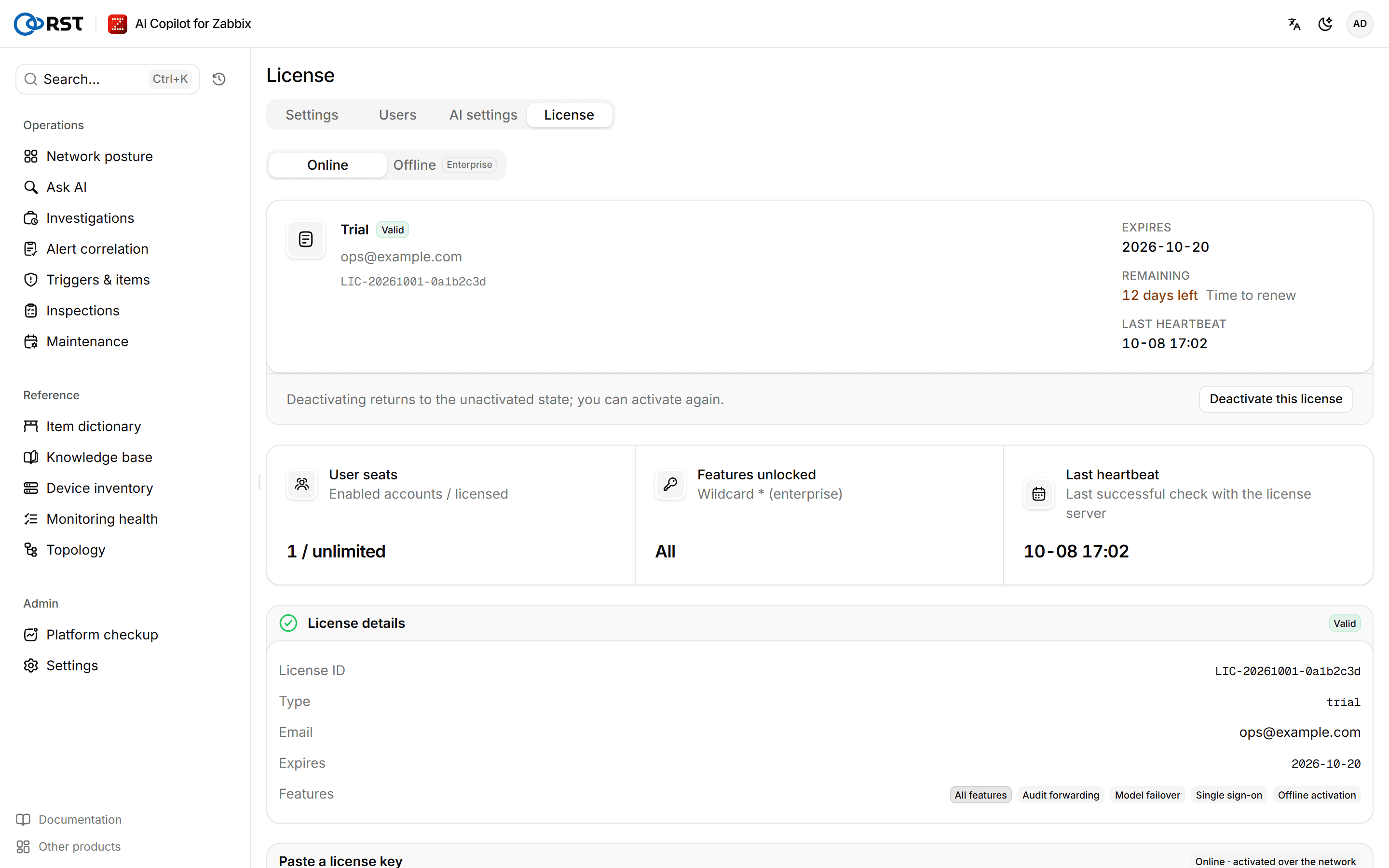
Open the license page
Steps
- Sign in as an administrator.
- Open Settings in the sidebar and select the License tab at the top.
Activation method at the top of the page offers Online and Offline; Online is the default.
Activate online
Prerequisites
- The administrator role.
- The gateway host can reach
license.reallysec.comon port 443.
Steps
- Keep Online under Activation method.
- Under Paste a license key, paste the license key you received (it starts with
ey), or select Upload a license file. - Select Activate.
The gateway binds this host with the license server and then sends a heartbeat once a day; renewals and edition upgrades arrive through the heartbeat. Online activation never requires sending the host fingerprint to anyone.
Activate offline
Offline activation needs an Enterprise license and is meant for hosts without internet access. Professional licenses activate online only.
Prerequisites
- The administrator role.
- An Enterprise license, including a trial.
Steps
- Under Activation method, select Offline.
- Under Host fingerprint, select Copy the host fingerprint and send it to Reallysec.
- When you receive the offline license file, select Upload a license file under Upload an offline license, or paste the file's content. The file can be
.lic,.txtor.json. - Select Activate.
The gateway checks the signature and the host fingerprint locally and unlocks; it sends no heartbeat and makes no outbound connection. An offline license fixes its features and term in the file, so a renewal or edition upgrade needs a new file.
The host fingerprint is tied to the gateway's state/machine-id. Do not regenerate or replace that file, or the current license stops working at once and has to be activated again. Back up the whole state/ directory.
Replace, renew or deactivate
- Replace or renew: paste the new license key under Replace or renew and activate it; there is no need to deactivate first.
- Deactivate: under Deactivate, select Deactivate this license, then Confirm. The gateway returns to the unactivated state and can be activated again. Do this before moving to another host.
License states
License overview shows the License status, Expires, Features unlocked and Usage. Within 30 days of expiry it shows Time to renew. User seats shows enabled accounts against the licensed number.
| State | Meaning | Paid features |
|---|---|---|
| Not activated | No license; the gateway runs as Community | Unavailable |
| Valid | Normal | Available |
| Expiring soon | Less than 7 days to expiry | Available |
| In grace period | Expired less than 7 days ago | Available |
| Expired | Expired more than 7 days ago; back on Community | Unavailable |
| Heartbeat lost | An online license has not reached the license server for more than 7 days; back on Community. It recovers once license.reallysec.com:443 is reachable again | Unavailable |
| Revoked | The issuer revoked the license; back on Community | Unavailable |
| Invalid | Signature, product or host binding does not match; usually the key belongs to another host | Unavailable, and so is everything else |
Back on Community, free features keep working, accounts and data are kept, and paid features are locked. When the license is expired, revoked or invalid, paste a new license key to activate again.
An invalid license does not fall back to Community: queries, analysis and the other features are unavailable, while signing in, changing passwords, accepting the EULA and the license page still work so an administrator can activate again.
User seats
The license sets the maximum number of enabled accounts: 1 for Community, 10 for a trial, and the purchased user count for Professional and Enterprise. If a license expires or is replaced by one with fewer users and enabled accounts exceed the seats, only administrators can sign in. Renewing, or disabling the extra accounts on the Users page, restores access.
AI settings
The LLM providers the gateway uses, reasoning effort, failover order, the knowledge base embedding model, field masking before data reaches the model, and failed cases. Available in every edition; multi-provider failover needs Enterprise.
Audit log
Records of sign-ins, queries, model calls, Zabbix write actions, and user and license changes: who, when, host group, action, outcome and latency. Filter and export to CSV, and export EULA acceptances. The local audit log is in every edition; forwarding to a SIEM needs Enterprise.