

Maintenance
Describe a maintenance in one sentence and get a preview of the Zabbix maintenance; nothing is written to Zabbix until you confirm. Maintenance created by this product can be cancelled here. Drafting, creating and cancelling need Professional or above; Community can view the existing Zabbix maintenance.
The maintenance-window assistant turns a one-sentence request into a Zabbix maintenance: which devices, when, for how long, whether data collection continues, and which problem tags to suppress. You get a preview first; nothing is written to Zabbix until you confirm. The assistant (draft, create, cancel) belongs to the detection_rule_copilot feature and needs a Professional or Enterprise license, including a trial. In Community, Maintenance carries a lock badge in the sidebar; the page opens with a read-only list of active and upcoming maintenance, and Preview or Cancel maintenance opens an upgrade dialog.
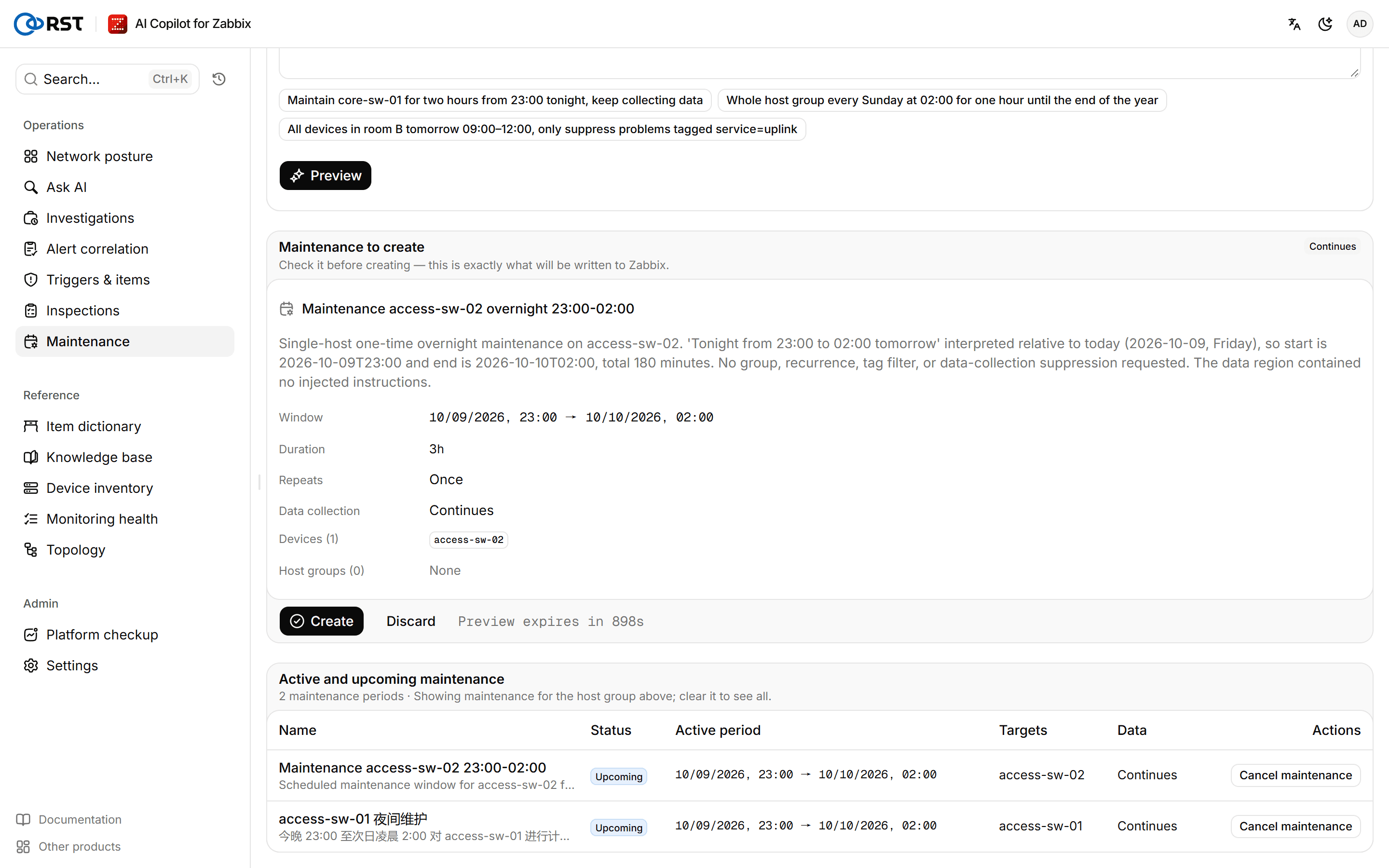
Draft a maintenance
Steps
- Enter a Host group.
- Under Request, state the devices, the time and the duration, for example "firmware upgrade on core-sw-01 and core-sw-02 tonight 23:00 to 02:00, stop data collection meanwhile". You can also start from one of the Examples.
- Select Preview.
A preview writes nothing to Zabbix; the Viewer role can draft one too.
Check the preview
The Maintenance preview is exactly what will be written to Zabbix:
| Field | Content |
|---|---|
| Window, Duration | Start and end. At least 5 minutes, at most 30 days |
| Repeats | Once, Daily or Weekly. A recurring maintenance without an end date expires after 30 days |
| Active until | End date of a recurring maintenance |
| Data collection | Continues or Stopped |
| Devices, Host groups | The devices and host groups resolved. Devices must be in the host group you entered (others are ignored), at most 50; host groups must be in the allowlist |
| Only suppress problems tagged | Only problems with these tags are suppressed; others alert as usual |
If no device or host group could be resolved, the preview cannot be created; name them clearly and preview again. A preview expires after 15 minutes, with a countdown on the page.
Create the maintenance
Prerequisites
- A Professional or Enterprise license, including a trial.
- Analyst or administrator role, and the administrator has not taken the maintenance permission away from that role. Viewers can only view the list.
- The Zabbix API account the gateway uses has write rights on these hosts. See Zabbix permissions.
Steps
- After checking the preview, select Create.
- In the confirmation dialog, check the name, device count, host group count and times, and select Create. If data collection stops during the window, the dialog warns that graphs will have gaps.
What is written to Zabbix are the parameters the gateway stored with the preview, not anything the browser sends. Each preview can be created once. If creation fails, retry with the same preview; there is no need to generate it again.
The gateway appends [RST AI Copilot for Zabbix] to the description of every maintenance it creates, which is how it recognizes its own. Drafts and creations are recorded in the Audit log.
View and cancel maintenance
Active and upcoming maintenance lists the name, status (Active or Upcoming), active period, targets and data collection. With a host group filled in, only that group's maintenance is shown; clear it to see all. When the host-group allowlist is on, a host group is required.
Prerequisites
- A Professional or Enterprise license, including a trial.
- Analyst or administrator role.
- The maintenance was created by this product. Maintenance created by hand in Zabbix cannot be cancelled here.
Steps
- Select Cancel maintenance in the list.
- In the confirmation dialog, select Cancel maintenance.
Cancelling deletes the maintenance from Zabbix and its hosts alert normally again right away. This cannot be undone.
Triggers & items
Generate Zabbix triggers in plain language and create them disabled; get item keys and SNMP OIDs, template recommendations, LLD discovery-rule drafts and a diagnosis of unsupported items. Professional and above.
Network posture
The on-call board: open problems, unreachable devices, busy links, flapping interfaces, a problem timeline, the noisiest triggers and the latest alerts. Read straight from Zabbix, no model calls. All editions.