

AI settings
The LLM providers the gateway uses, reasoning effort, failover order, the knowledge base embedding model, field masking before data reaches the model, and failed cases. Available in every edition; multi-provider failover needs Enterprise.
AI settings is a tab of the Settings page. It manages the LLMs the gateway calls; only administrators can view or change it. Each provider is an OpenAI-compatible endpoint or an Azure OpenAI deployment. You bring your own model, and the gateway does not limit the number of calls.
The provider list is stored in llm_providers.yml on the gateway (RST_LLM_CONFIG). Without that file, the gateway uses LLM_API_KEY, LLM_BASE_URL and LLM_MODEL from .env as its only provider.
Add or replace a provider
Prerequisites
- The administrator role.
Steps
- Under Model routing, select Add a provider.
- Select Expand the settings, pick the Kind, and fill in the Model, base URL and API key. Set Tags, Timeout (seconds) and Reasoning as needed.
- Check that the provider's enable switch is on (it is on for a new provider).
- When replacing, select Remove on the old provider.
- Select Save and reload.
Saving an empty list makes every model call fail, so when replacing a provider, add the new one first, remove the old one, then save.
| Field | Description |
|---|---|
| Kind | openai (and compatible gateways) covers Volcengine Ark, DeepSeek, Qwen, Ollama, vLLM and the like. Azure needs the API version and the Deployment name (not the model name) |
| Model | For example ark-code-latest, or the endpoint id for a self-built endpoint |
| API key | Paste a new key. Once one is saved, leave it empty to keep it; the page shows its last 4 characters |
| Tags | For example primary,cloud; labels only |
| Timeout (seconds) | Limit for one call, 30 by default for a new provider. Fault investigation and alert correlation can take minutes per call on a reasoning model, so raise it for slow models. Calls at high reasoning wait at least RST_LLM_THINKING_TIMEOUT_S seconds (600 by default) |
| Reasoning | See below |
Set the reasoning effort
Reasoning models (Doubao, GPT-5, Claude, Qwen3 and others) think before they answer, which adds tens of seconds per call. Reasoning is set per provider:
| Setting | Behavior |
|---|---|
| Auto (recommended) | Decided per task: no thinking for titles or follow-up suggestions, thinking for fault investigation |
| Off | No task thinks. Use it when the model is too slow |
| Low, High | Every task uses that level. Pick High when accuracy is all that matters |
The gateway recognizes the vendor from the base URL and model name and translates the setting into that vendor's parameters. If a request with reasoning parameters is rejected (HTTP 400), it is retried once without them.
Failover
Failover chain lists the enabled providers in the order of the Model routing list. A new provider goes to the end of the list.
- Enterprise (including a trial): when a call fails, the same request moves on to the next provider in turn.
- Community and Professional: only the first enabled provider is used and there is no switch when it fails; the others show Standby · no switch.
Check model health
| Metric | Meaning |
|---|---|
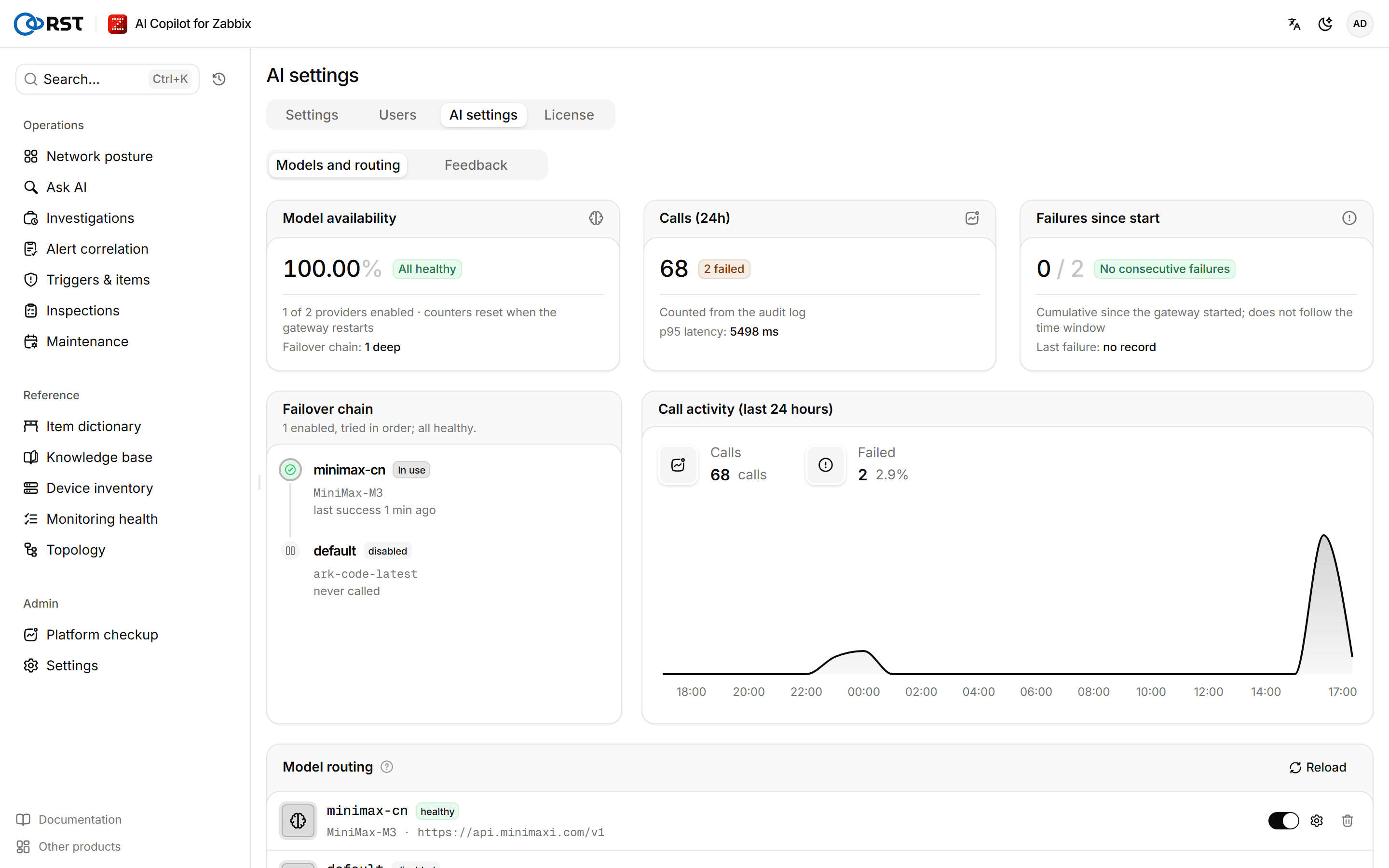
| Model availability | How many enabled providers are healthy. The counts reset when the gateway restarts |
| Failover chain | How many providers calls can currently fail over through |
| Calls (24h) | Calls, failures and p95 latency from the audit log. Not shown when auditing is off |
| Failures since start | Failures since the gateway started, whether a provider is failing repeatedly right now, and the last failure |
Failover chain and call activity shows the provider in use, each provider's last success and consecutive failures, and the call volume over the last 24 hours.
Set the knowledge base embedding model
Runbook embedding model embeds and searches the knowledge base. Fill in the Model ID; leave the endpoint and key empty to reuse the chat model's. Select Test connection, and Vector dimensions fills in. Turn on Enable and save. You cannot save before the test passes.
Field masking
Before sending data to the model, the gateway masks it according to the masking mode. Content pushed to external channels such as Feishu or email is masked the same way. The mode is set under Field masking in Settings; all three modes are available in every edition.
| Mode | What happens before sending | Use when |
|---|---|---|
| Cloud | IPs keep their first three octets, such as 10.30.12.x. Account names keep their first and last characters; the local part of email addresses is hidden. Secrets, tokens, cookies, ID numbers and similar become [REDACTED]. IPs and phone numbers in free text are masked too | The model runs in a public cloud |
| Private | IPs keep their first two octets, such as 10.30.x.x. Account names and email addresses are partly hidden. Secrets and tokens are still replaced | The model runs in your own data center |
| Air-gapped | Nothing is replaced | A local model; data never leaves the network |
If the page has no setting, the mode comes from RST_MASKING_MODE in .env, and defaults to Cloud.
Review failed cases
The Feedback tab lists the queries users marked as wrong in the chat, with the question, the generated API call, the API call the user suggested and any comment. Filter or delete them, or select Export JSON to use them as a regression set when changing prompts.
Users
Accounts for the gateway's own login and their four roles. Create, change roles, disable, reset passwords and delete; the auditor role and separation of duties. Community has 1 user, Professional is per seat, the auditor role needs Enterprise.
License
Community, Professional, Enterprise and trial compared; online and offline activation; replacing, renewing and deactivating; license states, expiry, revocation and the fall-back to Community when contact is lost; user seats. Offline activation needs an Enterprise license.