

Triggers & items
Generate Zabbix triggers in plain language and create them disabled; get item keys and SNMP OIDs, template recommendations, LLD discovery-rule drafts and a diagnosis of unsupported items. Professional and above.
Triggers & items lowers the bar for Zabbix configuration: trigger expressions, item keys, SNMP OIDs, templates and LLD. The page has five tabs: Trigger, Item key / OID, Templates, Discovery (LLD) and Unsupported items. The whole page belongs to the detection_rule_copilot feature and needs a Professional or Enterprise license, including a trial. In Community you can open the page as a preview; generating, diagnosing and similar actions open an upgrade dialog.
Apart from Create in Zabbix (disabled) on the Trigger tab, everything here is read-only towards Zabbix: the output is a draft you check and configure by hand. Output follows your interface language.
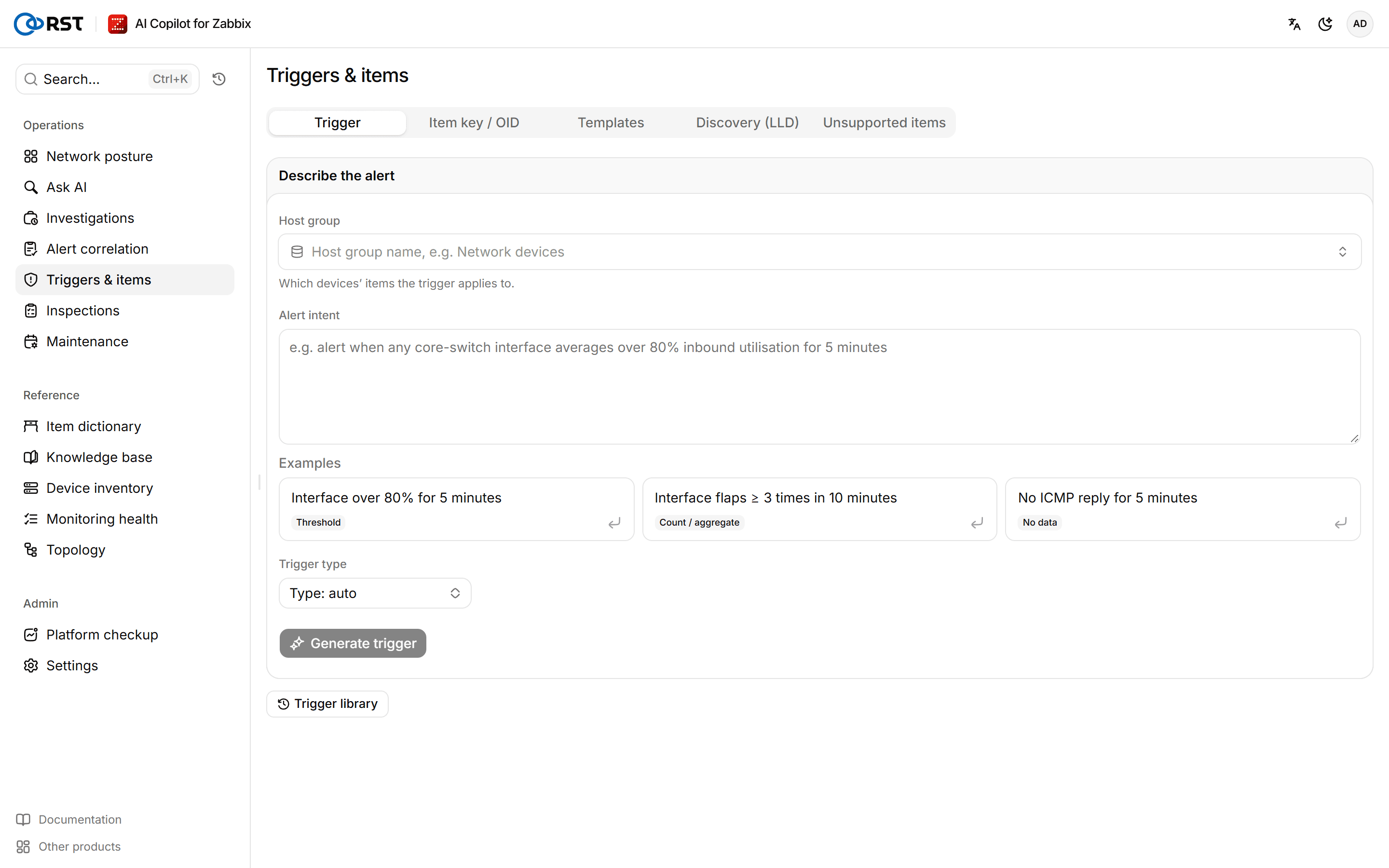
Generate a trigger
Steps
- Enter a Host group. It decides which devices' items the trigger applies to.
- Under Alert intent, state the item, the condition and the time window, for example "alert when any core-switch interface averages over 80% inbound utilisation for 5 minutes". You can also start from one of the Examples.
- (Optional) Pick a Trigger type: Threshold, Count / aggregate or No data. With Type: auto the model decides.
- Select Generate trigger.
When you select Turn into a trigger in Ask AI, the question is filled in as the alert intent.
The generated trigger shows the Trigger expression, Recovery expression, Tags and Confidence, and how many knowledge base documents were used. Show the full trigger JSON shows every field, with Copy JSON and Export JSON. When the intent is too vague, the page says The model did not produce a trigger and suggests stating the condition, time window and item key.
Create the trigger in Zabbix
Prerequisites
- Analyst or administrator role, and the administrator has not taken the create-trigger permission away from that role.
- The Zabbix API account the gateway uses has write rights on the target hosts. See Zabbix permissions.
Steps
- Under Create on which devices, select the devices.
- Select Create in Zabbix (disabled), then Create it? Click again.
- Once created, select Open in Zabbix, review the trigger there and enable it by hand.
Triggers are always created disabled; the gateway never enables a trigger. The creation is recorded in the Audit log.
To deploy by hand instead, select Steps to deploy it in Zabbix by hand:
- Zabbix → Data collection → Hosts → pick the device → Triggers → Create trigger.
- Paste the expression and recovery expression, set the name and severity.
- Keep it disabled and watch for false alarms for a while.
- Enable it once the false-alarm rate is acceptable.
Trigger library
Save to library stores the trigger in the team's shared library, where you can reload or export it later. Export all downloads every trigger in the library. Saving and deleting need the analyst or administrator role; the Viewer role can generate and view, but not write to Zabbix or the library.
Get item keys and OIDs
Steps
- On the Item key / OID tab, describe the Requirement in one sentence, for example "collect inbound traffic (bps) on every switch interface".
- (Optional) Fill in Vendor / model (optional), for example Huawei S5700, Cisco IOS-XE, H3C.
- Select Suggest items.
Suggested items lists the key, SNMP OID, type, value type, units, interval and preprocessing. Entries checked against the built-in reference are marked Checked against the knowledge base; the rest are marked Unverified — test it on a lab device first. Entries suited to LLD are marked LLD prototype. When an official template may already cover the need, the page names it.
Recommend templates
Steps
- On the Templates tab, enter a host group and pick a Device.
- Select Recommend templates.
The gateway reads the device's sysDescr, interfaces and linked templates, and picks the best fit from the templates in your Zabbix. When information is missing, the page lists what is Still needed.
Draft an LLD discovery rule
Steps
- On the Discovery (LLD) tab, describe what to discover, for example "discover every physical interface that is up and collect in/out traffic and errors".
- Select Draft LLD rule.
The Discovery rule draft has the discovery rule, its filter, item prototypes and trigger prototypes. Nothing is written to Zabbix; create it in a Zabbix template by hand and test it on a lab device.
Diagnose unsupported items
Steps
- On the Unsupported items tab, enter a host group and optionally pick a device; the default is the Whole host group.
- Select Diagnose.
The page lists items in the unsupported state with the Zabbix error, the Cause and Fix steps, and where useful a Suggested key or Suggested OID. If the model is unavailable, items are only classified by their error text.
Alert correlation
Collapses a burst of concurrent problems into alert storms with a root-cause device and blast radius, then has AI score the remaining groups and recommend actions. Professional and above.
Maintenance
Describe a maintenance in one sentence and get a preview of the Zabbix maintenance; nothing is written to Zabbix until you confirm. Maintenance created by this product can be cancelled here. Drafting, creating and cancelling need Professional or above; Community can view the existing Zabbix maintenance.