

Audit log
Records of sign-ins, queries, model calls, Zabbix write actions, and user and license changes: who, when, host group, action, outcome and latency. Filter and export to CSV, and export EULA acceptances. The local audit log is in every edition; forwarding to a SIEM needs Enterprise.
The audit log shows the events the gateway records. It is a tab of the Platform checkup page, available in every edition and on by default. Administrators can read it; with separation of duties on, only auditors can. Events are stored in state/audit.db on the gateway (RST_AUDIT_DB); include it in your backups.
Zabbix only records the API account the gateway uses, not which engineer acted. For write actions such as acknowledging problems, creating triggers and creating maintenance windows, this page is the record of who did it.
Turn auditing on or off
The audit switch is on the Audit forwarding tab of Outbound channels.
Steps
- Open Outbound channels and select the Audit forwarding tab.
- Turn Enable auditing on or off.
- Select Save and apply.
With auditing off, this page and the 24-hour call volume in AI settings have no data.
Call overview
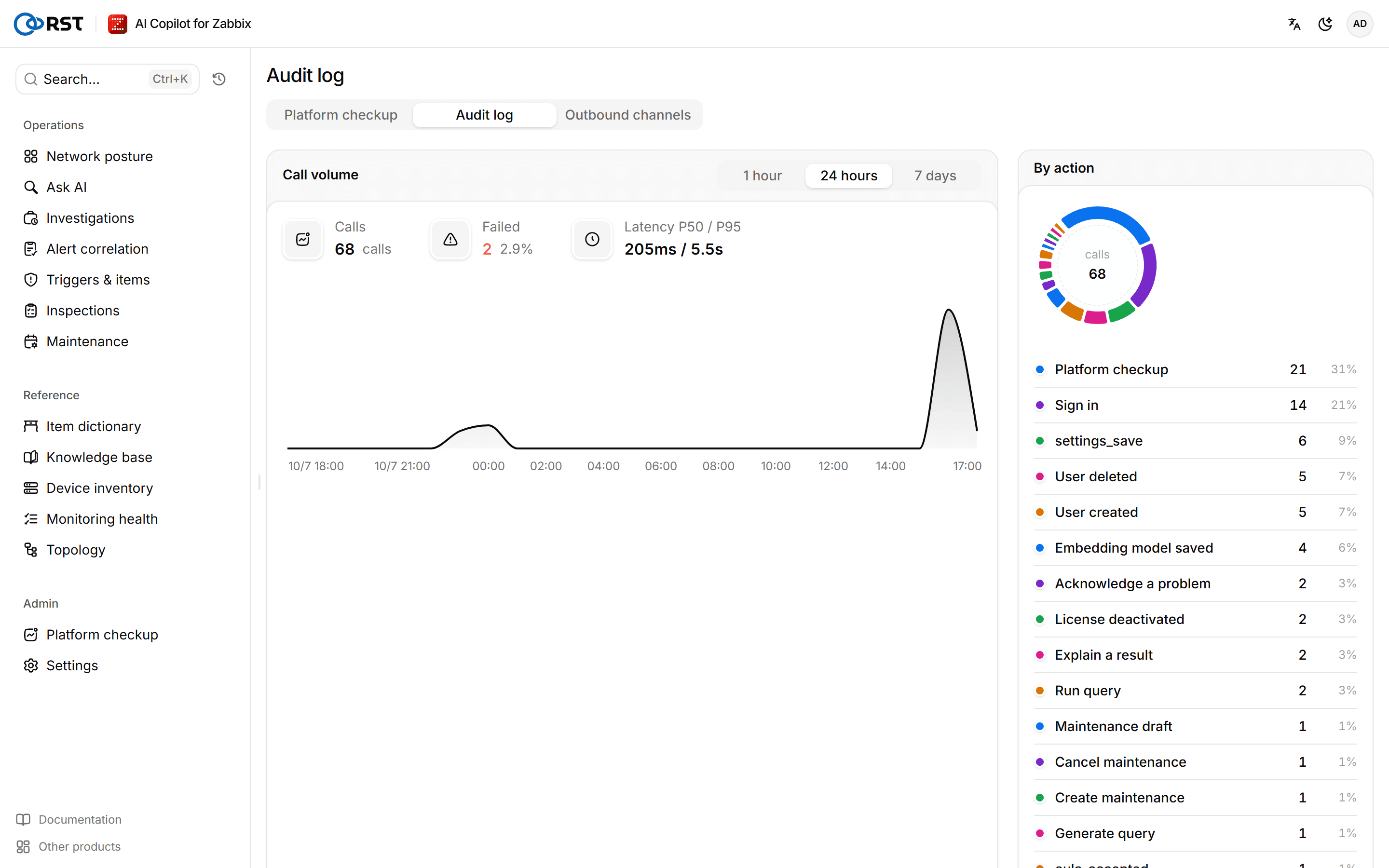
Call overview covers 1 hour, 24 hours or 7 days and shows Calls, Failed, Latency P50 / P95, the Call volume chart and the breakdown By action.
Find audit events
Steps
- In Events, pick a time range, filter by Action, Outcome, User (exact match) or Host group (exact match), and select Query.
- Select View details on an event.
- (Optional) Select Export CSV to export the current page.
The details show the event's fields. Select Show the raw JSON to see the raw event, and Copy JSON to copy it.
Export EULA acceptances
Every user must accept the current version of the end-user license agreement (EULA) at first sign-in, and again when the EULA version changes. The gateway records the account, EULA version, time, IP and browser of each acceptance.
Steps
- In Events, select EULA acceptances.
The browser downloads a CSV with every user's acceptances. Each acceptance is also an audit event.
Forward the audit log to a SIEM
Audit events can be forwarded to syslog (RFC 5424) and to a webhook (POST JSON) at the same time. Forwarding is an Enterprise feature; other editions write the local audit log only, and the forwarding addresses have no effect.
Prerequisites
- The administrator role.
- An Enterprise license, including a trial.
Steps
- On the Audit forwarding tab of Outbound channels, enter the Syslog URL, for example
udp://syslog.example.com:514.udp://,tcp://andtls://are supported. - (Optional) Enter the Webhook URL and, if needed, Webhook headers in the form
Header1:Value1;Header2:Value2. - (Optional) Set TLS verification. It applies to the webhook and to
tls://syslog, and verifies by default. - Select Save and apply. Leave a saved address empty to keep it.
A forwarding failure is only logged; it does not affect the local audit log or the other target.
Actions
| Action | Source |
|---|---|
| Sign in, Sign out, Change password | The sign-in page and the Account page |
| Generate query, Run query, Explain a result, Explain data, Zabbix hand-off, Feedback | Ask AI |
| Fault investigation, Problem report, Acknowledge a problem | Live problems |
| Alert correlation | Alert correlation |
| Generate a trigger, Create a trigger | Triggers & items |
| Maintenance draft, Create maintenance, Cancel maintenance | Maintenance |
| Platform checkup, Checkup readout | Platform checkup |
| Item dictionary | Item dictionary |
| Asset import | Device inventory |
| User created, User changed, User deleted | Users |
| License deactivated | License |
| Embedding model saved | AI settings |
| Content pack applied, Content pack rolled back, Release staged | Online update and content packs in Settings |
Saving settings is also recorded, with the names of the settings that changed.
License
Community, Professional, Enterprise and trial compared; online and offline activation; replacing, renewing and deactivating; license states, expiry, revocation and the fall-back to Community when contact is lost; user seats. Offline activation needs an Enterprise license.
Outbound channels
Push reports, problems and inspection results to Feishu, DingTalk, WeCom, Teams, Slack or email: destinations, mail server, the private IM host allowlist and the delivery log. Failed deliveries retry automatically and can be resent. Available in every edition.