

Detection rules
One sentence of detection intent becomes a deployable scheduled saved search. Deploy, enable and edit in place; an ATT&CK coverage heatmap locates gaps. Licensed; the engine ships sealed.
The Detection rules page generates deployable saved searches from natural-language intent and is a paid capability. This page covers generation, deployment, ATT&CK coverage and external entry points.
Generation
Enter the intent ("detect more than 20 failed SSH logins from one source IP within 5 minutes"), pick an index or sourcetype and choose Generate rule. The agentic engine reads real field names first, writes the SPL and dry-runs it. About 19 s on the 1.9.0 test box.
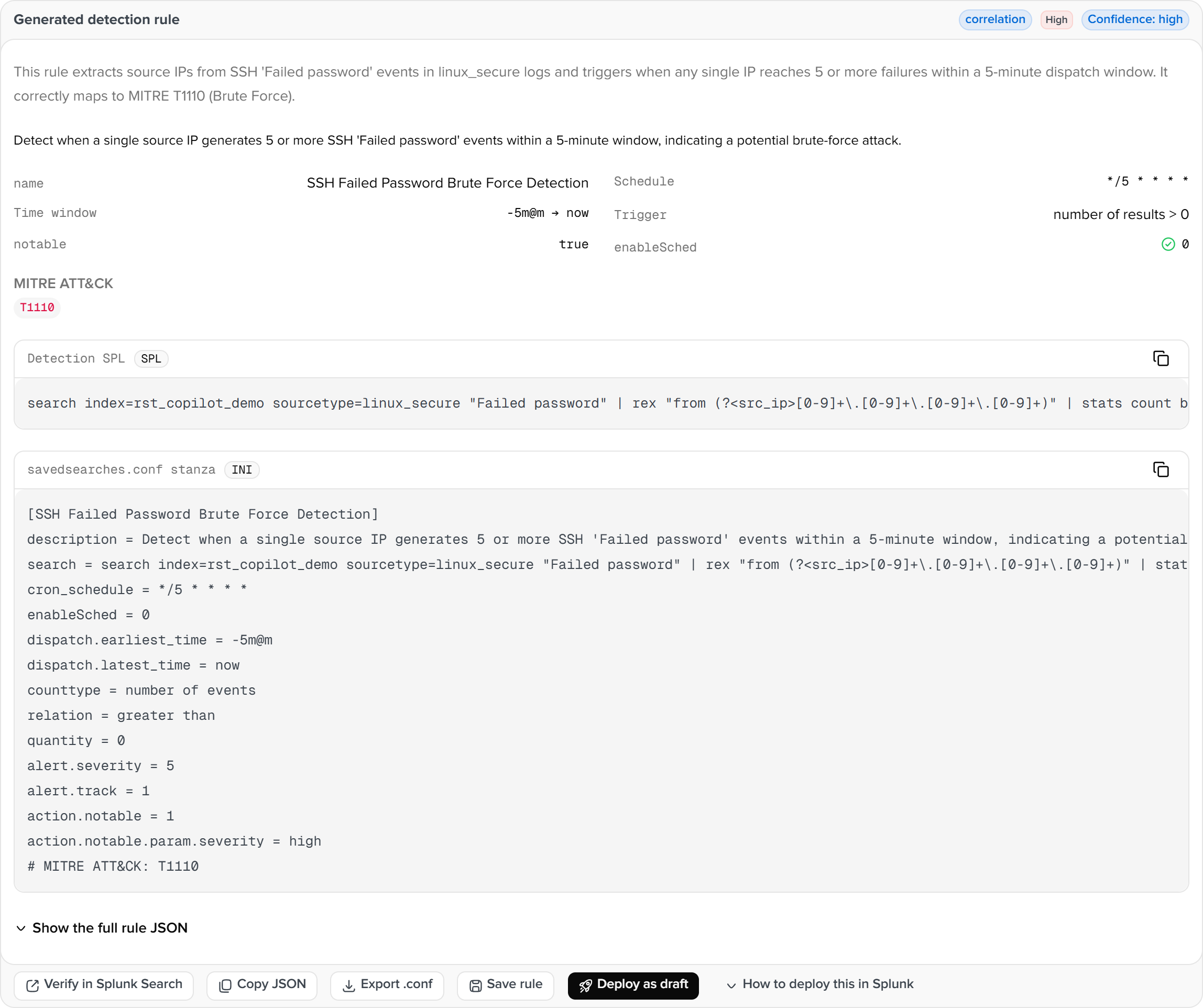
| Block | Content |
|---|---|
| SPL | The rule search, editable |
| Schedule | cron, time window, trigger (row count or threshold), severity, whether to create a notable |
| MITRE | Technique ids and names from the bundled ATT&CK table |
| stanza | The complete savedsearches.conf section, copyable |
| Type | scheduled_search, correlation (ES correlation-search form), auto |
Export downloads <name>.savedsearches.conf. Three example cards cover common intents and fill the form on selection.
The rule engine is a sealed paid feature: bin/detection_core.sealed is ciphertext and its key arrives with the enterprise licence's heartbeat, bound to this host's fingerprint. No licence, a licence without the feature, or an offline licence signed without the key all return feature_sealed.
Deployment
Deploy as draft (admin) writes the rule as a disabled saved search in the search app. The Deployed rules list below offers enable and pause, inline edits to SPL, severity and cron, and delete.

The keys written match the stanza (cron_schedule, alert.severity, alert.track, action.notable and others). A rejection by Splunk (a Free licence refuses alert.severity) comes back as deploy_rejected with Splunk's own message.
ATT&CK coverage
The second tab lays deployed rules over the ATT&CK Enterprise matrix. The matrix is a bundled compact table: 14 tactics, 222 techniques and 475 sub-techniques, August 2026 snapshot, updated with the package.
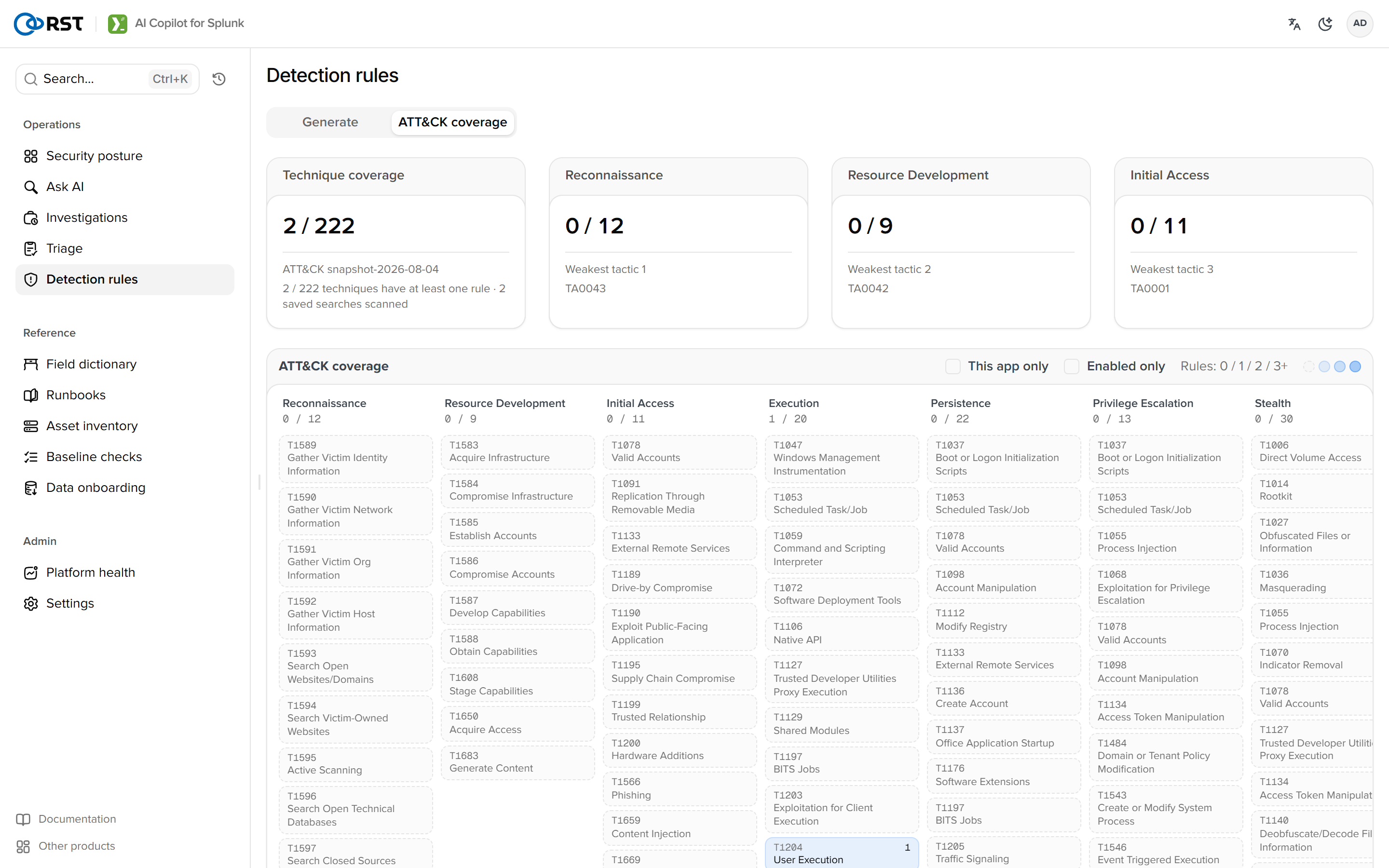
Coverage comes from three places: rules deployed by this app (MITRE field), ES correlation searches (mitre_attack in action.correlationsearch.annotations), and a T1234 regex over other apps' saved-search descriptions as a fallback. Sub-techniques fold into their parent cell; a rule spanning several tactics counts once.
| Element | Description |
|---|---|
| Cell colour | Number of rules: 0 blank, 1, 2 and 3 or more progressively darker. Hover lists rule names and enabled state |
| Header | Covered techniques out of total, the three weakest tactics |
| Filters | This app's rules only, enabled only |
| Empty cell | Selecting one returns to the Generate tab with the intent pre-filled ("Detect T1059 Command and Scripting Interpreter: …"). After generation and deployment the heatmap updates |
External entry points
Turn into a detection rule in the investigation dialog brings that alert's rule name, fields and conditions here. Alerts and Investigations have the same entry.
Triage
Cluster, score and rank a batch of alerts with one actionable recommendation per cluster. Dispositions follow the user across devices; per-rule false-positive rates drive noise-reduction suggestions. Licensed.
Field dictionary
Drill from index to sourcetype to field with coverage, type and sample values, read live from Splunk metadata.