

Settings
The tabs of the Settings page: Personal, Branding, Security, Login integrations, Email, Content safety (keyword filtering and personal information masking) and Cost.
The Settings page has a list of tabs on the left. Everyone sees Personal; administrators also see Branding, Security, Login integrations, Email, Content safety and Cost. Settings changed by an administrator apply to all users.
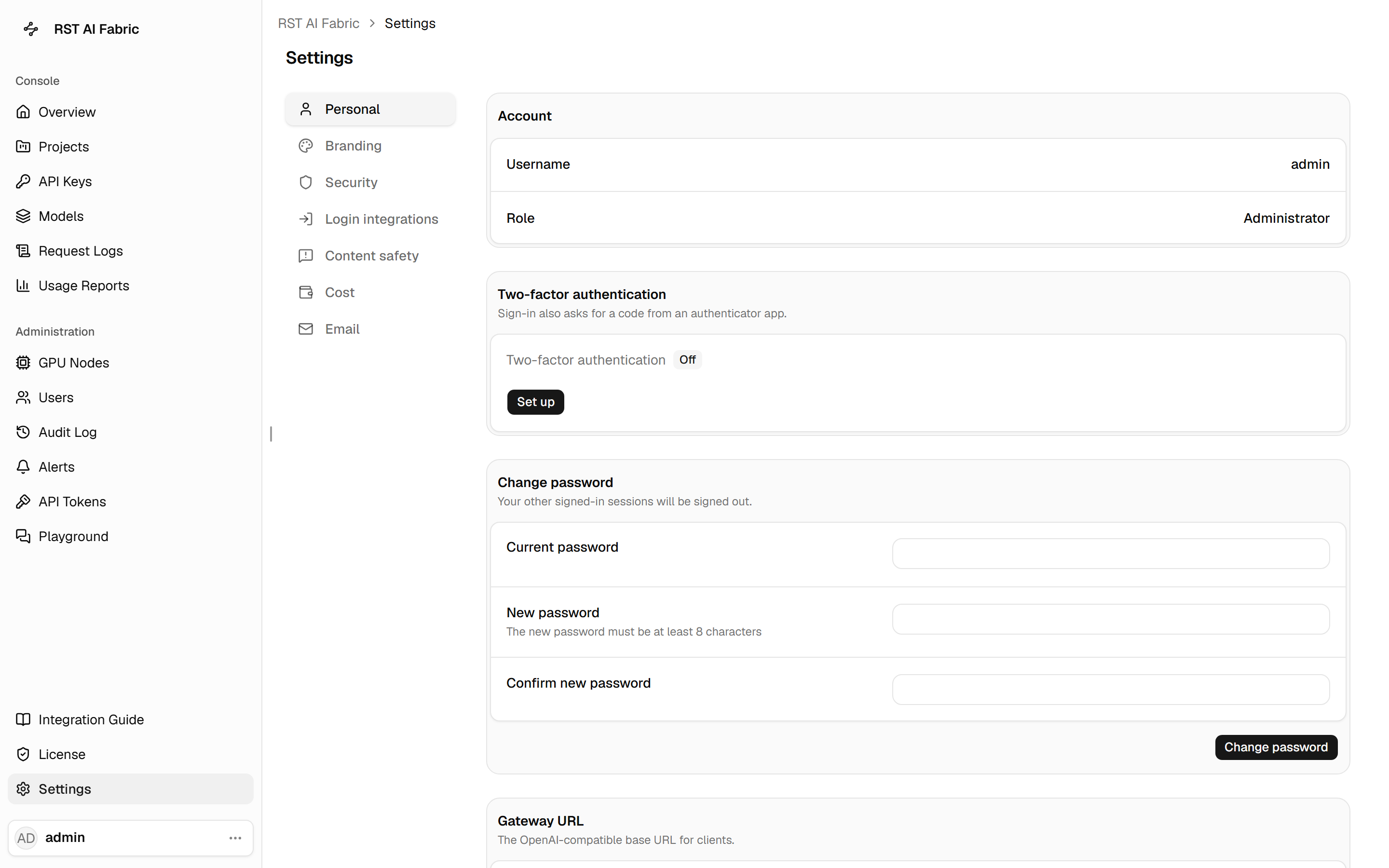
Personal
Account and role, two-factor authentication, password change, gateway URL, system information and, for administrators, the one-click upgrade card. See Console tour and Upgrade and backup.
Branding
Put your organisation's name, logos and colours on the console and login page. Changes preview across the console at once, apply to all users once saved, and revert if you leave the page without saving.
| Field | Description |
|---|---|
| Product name | Shown in the sidebar, on the login page and in the browser tab title; default RST AI Fabric |
| Logo | Used in the sidebar; a square icon works best |
| Logo for dark backgrounds | Shown when the sidebar uses the brand colour or dark mode; a white or light version works best |
| Login page logo, dark login page logo | Top left of the login page; a wide logo with the company name fits. One each for light and dark mode |
| Primary color | Seven presets (blue, indigo, violet, green, teal, orange, rose) plus the default, or a custom colour. Lightened automatically in dark mode |
| Accent color | Marks the current page in the sidebar; leave empty for no marker |
| Sidebar style | Light, or brand (filled with the primary colour, with black or white text chosen automatically) |
Logos can be PNG, SVG or JPEG, up to 5 MB before cropping; surrounding whitespace is trimmed and the result must stay under 256 KB. When a logo is uploaded, the browser tab icon uses it too. Restore defaults resets branding.
Security
| Setting | Description |
|---|---|
| Require two-factor authentication for administrators | Administrators without 2FA must set it up after signing in |
| Allow viewing keys again | On by default. Turning it off deletes every stored encrypted key copy at once, irreversibly; from then on keys are shown only at creation, and turning it back on only affects new keys. See API keys |
| Request log retention (days) | 90 by default; 0 keeps logs forever. Saving runs a clean-up at once and overrides the RST_FABRIC_LOG_RETENTION_DAYS environment variable |
If the encryption key cannot be loaded, a note next to Allow viewing keys again asks you to check the service log, RST_FABRIC_SECRET_KEY or the secrets volume.
Login integrations
OIDC single sign-on, Feishu sign-in and LDAP / AD sign-in, which can be enabled together. Each shows whether it is on; select Configure to open its form. See Sign-in integrations.
The SMTP server for email alerts: server address, port, username (empty if the server needs no authentication), password, sender, and TLS (usually needed on port 465). After changing the server address you must enter the password again.
Content safety
Content safety applies to every call, including the playground. The two forms are saved separately.
Keyword filtering
| Setting | Description |
|---|---|
| Enable keyword filtering | When off, nothing is checked |
| On match | Block: the whole request is refused with 400 content_blocked and logged. Mask: matched words become *** and the call continues |
| Keywords | One per line, case-insensitive, up to 10,000 |
All text fields in the request body are checked, including system prompts, tool arguments and rerank and score inputs. IDs, roles, types and images are skipped.
Personal information masking
Personal information in requests is handled before it reaches the model or the logs.
| Setting | Description |
|---|---|
| Enable personal information masking | Applies to every call, including system prompts, tool arguments and tool results |
| Detect | Mobile numbers, Chinese ID numbers, bank card numbers, email addresses; at least one |
| When found | Mask and continue: replace and call as usual; the X-PII-Masked response header gives the number of replacements. Block: refuse the whole request with 400 pii_blocked; the message lists only the types, never the numbers |
| Replace with | Type placeholder, such as [手机号]: the model knows a mobile number was there but sees no digits. Recommended. Partial mask, such as 138****5678: keeps a few leading and trailing digits |
| Also mask model output | Chat replies (including streams) are masked the same way. When off, retained reply content is still masked |
Only complete numbers match; digits directly next to letters, digits, underscores or a decimal point do not:
- Mobile numbers: 11 digits starting with 1, optionally with
+86, optionally grouped 3-4-4 with spaces or-. - Chinese ID numbers: 18 digits with valid province code, birth date and check digit, last character may be X; 15-digit legacy numbers are recognised too.
- Bank card numbers: 16 to 19 digits with a valid issuer prefix and Luhn check digit, optionally grouped in fours. Millisecond timestamps, snowflake IDs and date-based order numbers do not match.
- Email addresses:
[email protected].
Try it checks a sample text with the current, unsaved types and replacement style. Nothing is saved or logged.
Masking does not touch JSON number fields in requests, logprobs, or the output of embeddings and rerank.
Cost
Enter Fixed cost per month (¥): hardware depreciation, hosting, staff time and other costs of running locally, spread per day. The value report uses it to compute net savings.
Audit log
The management actions recorded in the audit log, its fields, filters and detail view, and CSV export.
License
What a licence covers, online and offline activation, licence states and the offline grace period, restrictions without a licence, the inference node limit and gateway activations, and how to buy.