

Console tour
Signing in to the console, the sidebar groups and pages, the three roles and their permissions, personal settings, language and theme, and the notice shown without a licence.
The console is at http://<host>:8080, or at the reverse proxy's address once HTTPS is set up. The login page lets you switch between Chinese and English and between light, dark and system themes. When single sign-on, Feishu or LDAP is enabled, the login page offers those methods; see Sign-in integrations. There is no self-registration: administrators create accounts on the Users page, or identity providers provision them at first sign-in.
Pages
The sidebar has two groups, Console and Administration, with Integration Guide, License, Settings and the user menu at the bottom. Only administrators see the Administration group. The sidebar can collapse to icons.
| Group | Page | Contents | Visible to |
|---|---|---|---|
| Console | Overview | Requests, tokens, cost, error rate and latency trends, model and key rankings, GPU resources | Everyone |
| Projects | Projects, budgets, members, prepaid balances and monthly statements | Everyone | |
| API Keys | Create and manage keys | Everyone | |
| Models | Models, upstreams and routing | Administrators and read-only users; only administrators can change them | |
| Request Logs | Details of every call | Everyone | |
| Usage Reports | Usage and cost by project, key, model and date; value report | Everyone | |
| Administration | GPU Nodes | GPU server status and vLLM deployments | Administrators |
| Users | Accounts and roles | Administrators | |
| Audit Log | Record of management actions | Administrators | |
| Alerts | Alert channels and rules | Administrators | |
| API Tokens | Tokens for external systems calling the console API | Administrators | |
| Playground | Chat with a model in the console | Administrators | |
| Bottom | Integration Guide | Call examples for this gateway's URL, and error codes | Everyone |
| License | Licence status and activation | Administrators and read-only users | |
| Settings | Personal settings; administrators also get branding, security, login integrations, email, content safety and cost | Everyone |
Roles
| Role | Permissions |
|---|---|
| Administrator | View and change everything: models, projects, keys, users, GPU nodes, alerts, settings, licence, upgrades |
| Project member | Sees only the projects they belong to, with those projects' keys, request logs, usage and overview. Can create keys in their projects, and can only lower limits or tighten restrictions. Cannot see the Models and License pages |
| Read-only | Views every page in the Console group and data for all projects; cannot change anything |
Projects also have project roles: an Owner manages all keys and members of the project, a Member manages only the keys they created. See Projects.
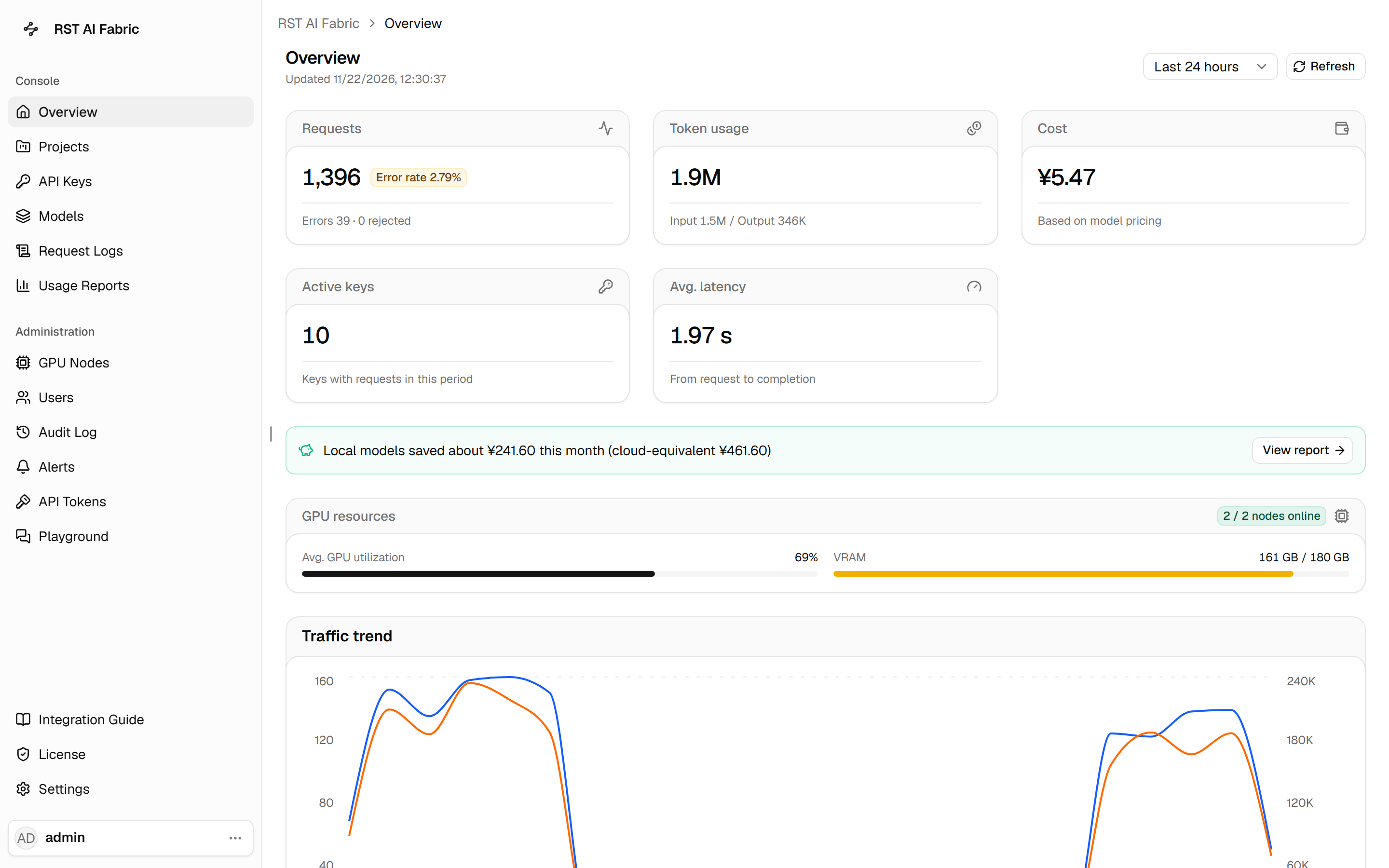
Overview page
Overview is the home page after sign-in. Choose the last 24 hours, the last 7 days, the last 30 days or a custom period (up to a year; a single day is shown by hour).
- Metric cards: requests and error rate, tokens (input / output), active keys, cost, average latency.
- Trend chart: requests, errors and tokens.
- Model and key rankings by token usage.
- GPU resources: nodes online, average GPU utilisation and memory; see GPU nodes.
- Once models have reference prices, this month's cloud-equivalent cost and savings; see Usage reports.
Project members see their own projects only. If the chosen period starts before the log retention period, statistics start at the retention boundary and the page says so.
Personal settings
Under Settings > Personal you can:
- See your account and role.
- Turn two-factor authentication on or off.
- Change your password (local accounts). Other signed-in sessions end. OIDC, Feishu and LDAP passwords are changed in their own identity systems.
- Copy the Gateway URL, the OpenAI-compatible base URL for clients.
- See System information: version, time zone, log retention and queue timeout.
- As an administrator, use the One-click upgrade card; see Upgrade and backup.
The user menu at the bottom of the sidebar switches the language (中文 / English) and theme, and signs you out.
No-licence notice
When the licence is not activated or no longer valid, a notice appears at the top of the page; select Activate to open the License page. Until then you cannot create API keys or models, and the gateway rejects every call; existing keys can still be edited, disabled and deleted. If the licence server cannot be reached and the gateway is in its offline grace period, the notice says so.
Upgrade and backup
New-version notices, one-click upgrades from the console (online or offline package) with their steps and automatic rollback, manual upgrades, backing up and restoring the database and the key encryption key, and manual recovery after a failed rollback.
Models
Adding models and upstreams, provider types and cloud models, aliases, fallback models, long-context routing, concurrency limits and priority, prices and reference prices, connection tests and the model detail page.