

Projects
Project budgets, billing and conversation retention, members and project roles, top-ups, adjustments and balance transactions for prepaid projects, and monthly statements.
A project groups keys, members and budgets, and usually stands for a department or an application. The built-in Default project cannot be deleted. Key usage and cost roll up to the project.
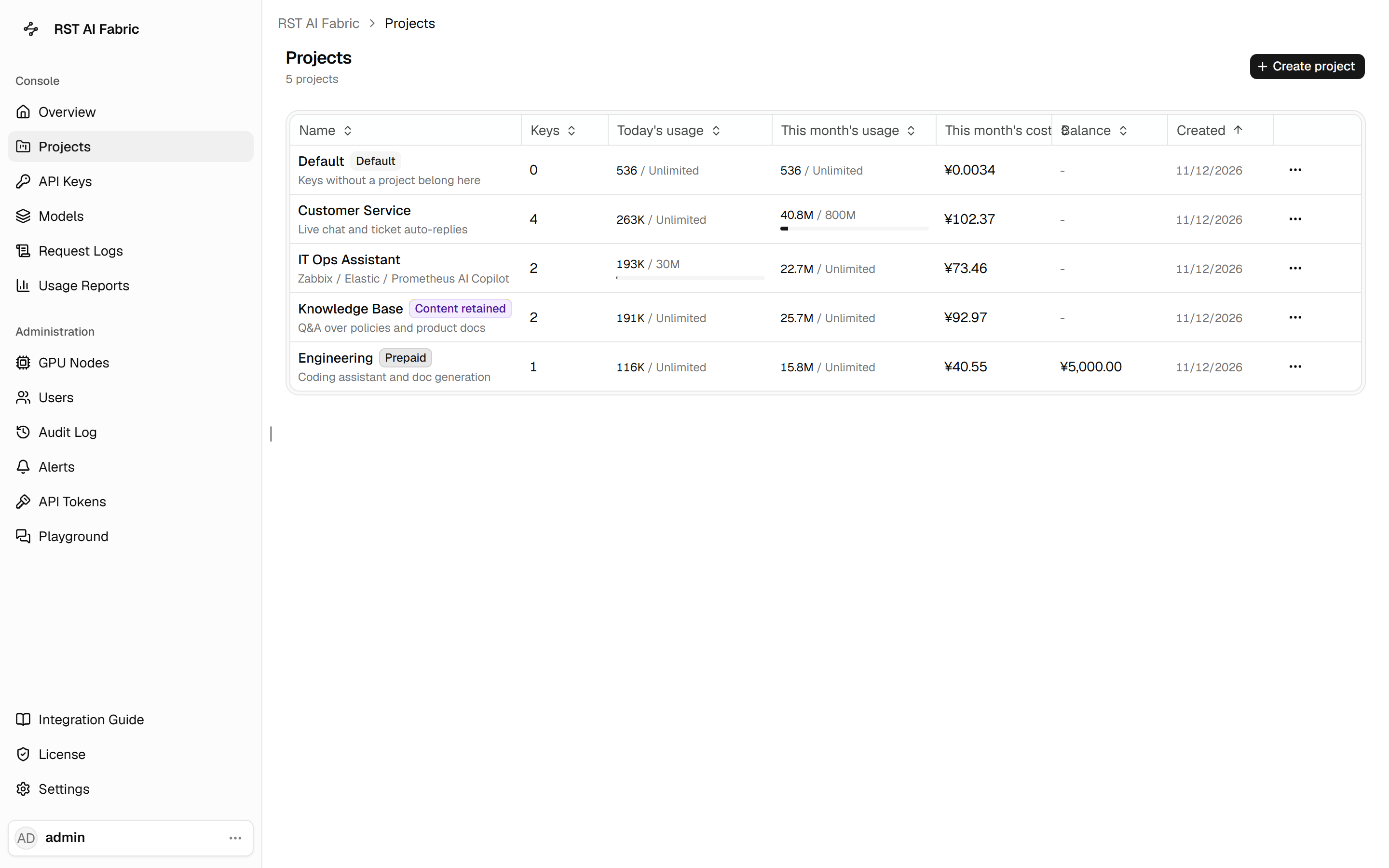
The Projects page lists each project's key count, usage today, usage this month against budget, and cost this month. Administrators see every project; project members see only their own; read-only users see every project but cannot change anything.
Create a project
Only administrators can create, edit and delete projects. Projects can be created without a valid licence.
| Field | Description |
|---|---|
| Name, description | Project name and notes |
| Daily token budget, Monthly token budget | Total for all keys in the project; 0 means unlimited. Once exceeded, every key in the project gets 429 budget_exceeded. Budgets reset on calendar days and months in RST_FABRIC_TIMEZONE |
| Billing | Not billed, or Prepaid: each call is charged against the balance, and calls are rejected with 402 insufficient_balance when it runs out |
| Retain conversation content | For compliance audits: stores the request and response text of this project's calls, each truncated to 64 KB, for the request log retention period. Only administrators can view it |
Only a project without keys can be deleted. Delete its keys or move them to another project first.
Members and roles
From the project's action menu, select Members to add users and set their project role. Only accounts with the Project member user role can join a project.
| Project role | Permissions |
|---|---|
| Owner | Manages all keys and members of the project |
| Member | Manages only the keys they created |
Administrators and project owners can add, change and remove members. Project members cannot set key priority or change project budgets. When editing keys they can only lower limits or tighten restrictions: they cannot re-enable a disabled key, widen the model list, raise or remove limits, budgets or quotas, extend the expiry date, or remove or loosen an IP allowlist set by an administrator. Loosening takes an administrator.
Prepaid billing
A prepaid project's balance is charged per call in real time. When a request arrives, the gateway holds an amount based on estimated input tokens plus the output cap, and settles on actual usage when the request ends, so concurrent requests cannot overdraw the balance together. When the balance is short, calls get 402 insufficient_balance.
Top up and adjust: administrators select Top up / Adjust in the project's action menu. Positive amounts top up; negative amounts deduct and require a note. Amounts are rounded to the cent.
Transactions: select Transactions to see each top-up and deduction with the balance after it. Anyone who can see the project can view them.
An alert can be sent when the balance drops below a threshold; see Alerts.
Monthly statement
From the project's action menu, select Statement to see the project's usage and cost for a month, for internal chargeback between departments. It shows this month's cost, top-ups and current balance, with breakdowns by model, date and key and the balance transactions. Choose the Statement month, and use Print / Export PDF to print it or save it as a PDF.
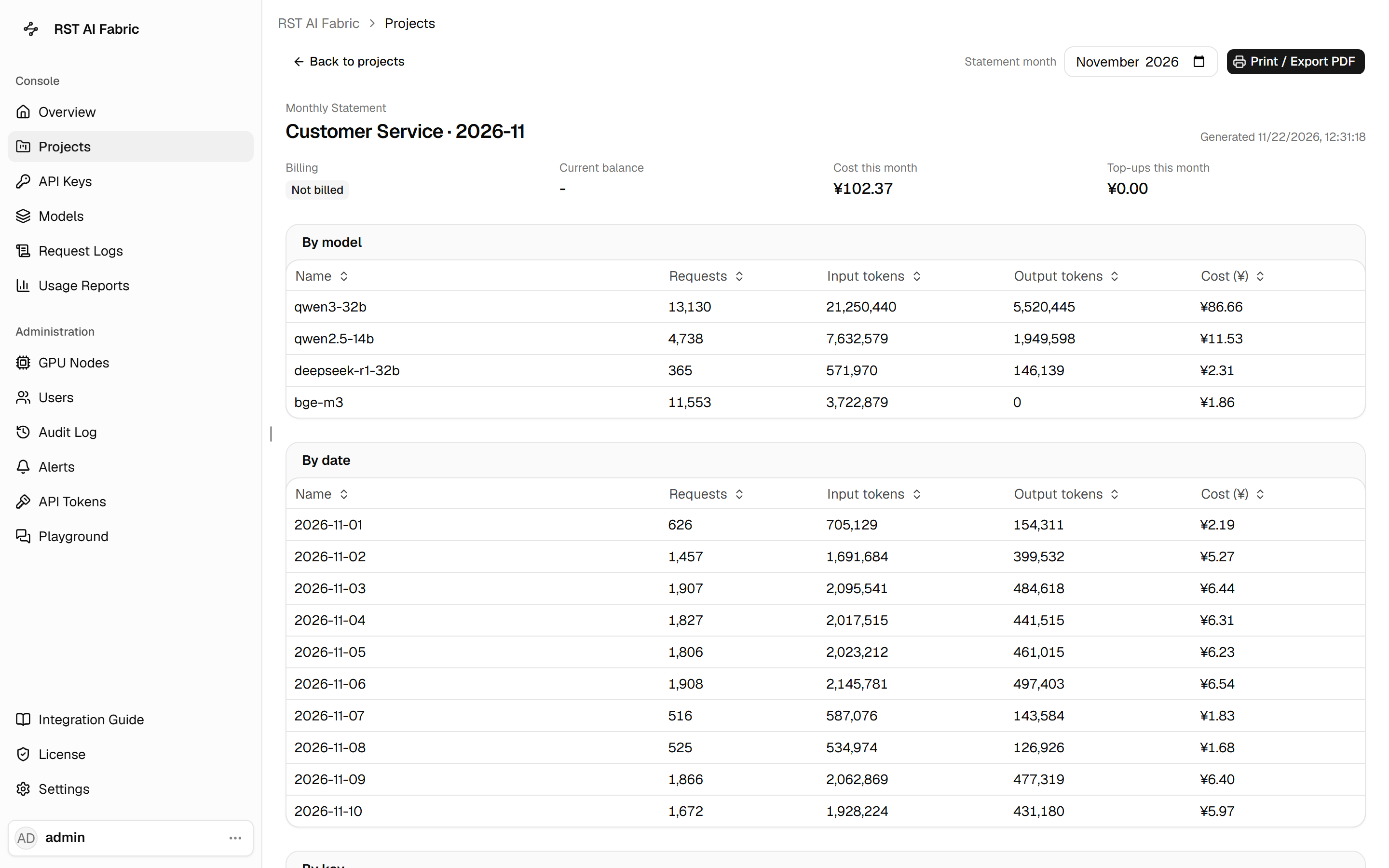
Days are counted in RST_FABRIC_TIMEZONE.
Models
Adding models and upstreams, provider types and cloud models, aliases, fallback models, long-context routing, concurrency limits and priority, prices and reference prices, connection tests and the model detail page.
API Keys
Creating API keys and the limits you can set, groups and notes, viewing and regenerating keys, enabling, disabling, deleting and bulk actions, moving a key to another project, and the key detail page.