

API Keys
Creating API keys and the limits you can set, groups and notes, viewing and regenerating keys, enabling, disabling, deleting and bulk actions, moving a key to another project, and the key detail page.
An API key is a caller's credential for the gateway. It looks like sk-rst-… and belongs to a project. Create a separate key per application or environment (for example "Support desk - production") so you can control which models it may use and how much.
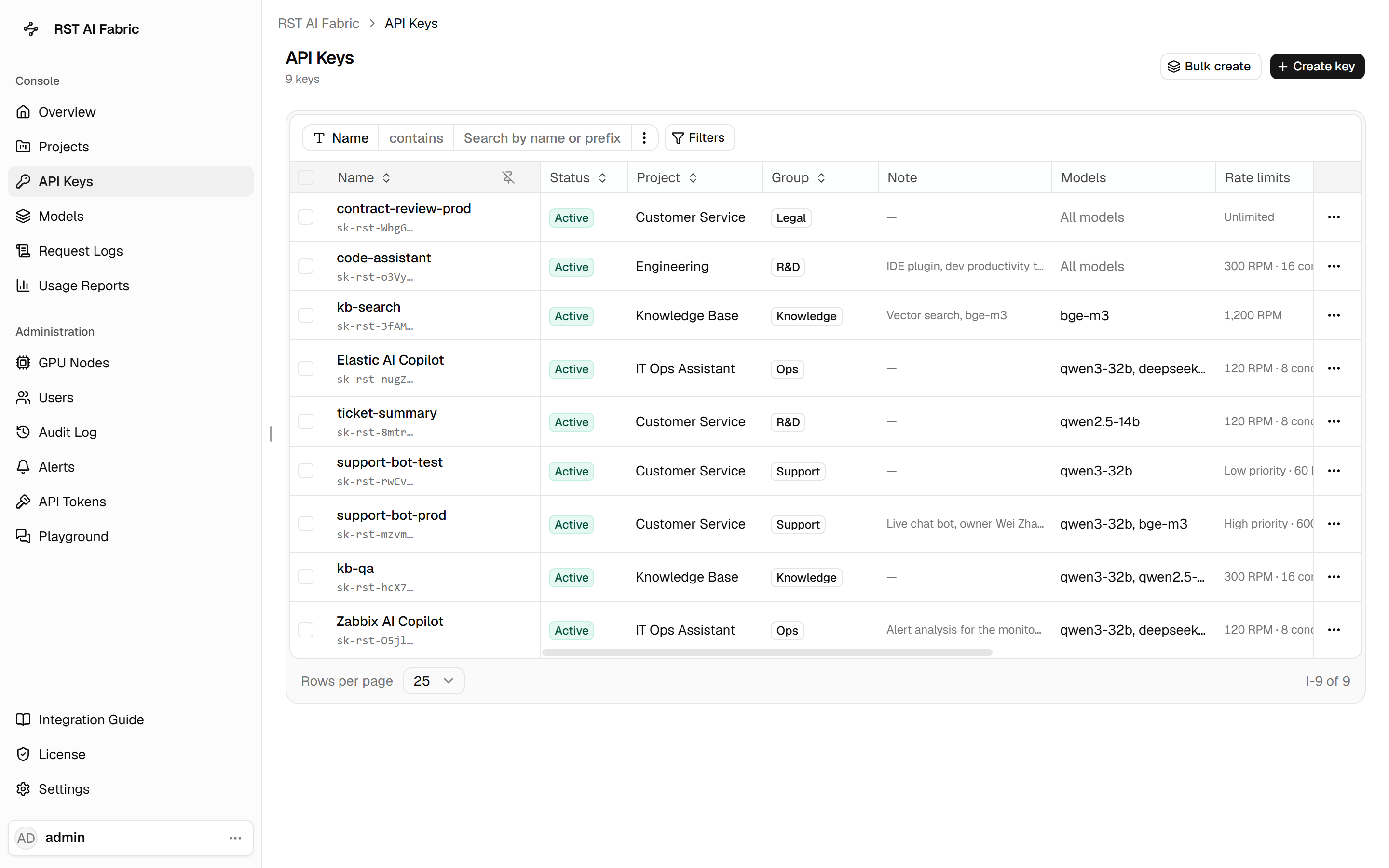
The API Keys page lists the keys you can see: name, status, models, project, group, note, limits, usage today and this month, quota, last used and expiry. Search by name or prefix (notes match too), and filter by project, status and group.
Create a key
Prerequisites
- A valid licence.
- The administrator role, or the project member role in the target project.
Steps
-
Select Create key.
-
Enter a name and choose the project. Optionally add a Group (such as a department or environment; typing a new name creates the group) and a Note (such as owner or purpose).
-
Set limits as needed; 0 means unlimited. Apart from Allowed models and Expires, these fields are under the collapsed Advanced options:
Field Description Allowed models When none are selected, every enabled model can be called RPM, TPM Requests and tokens per minute; exceeding them returns 429 rate_limit_rpmorrate_limit_tpmMax concurrency Requests in progress at once; exceeding it returns 429 rate_limit_concurrencyPriority High, Normal or Low. When a model is at capacity, higher-priority requests are served first. Only administrators can set it Max output per request (max_tokens) A larger max_tokensin the request is lowered, and a missing one is added. Withn,best_ofor several prompts the cap applies per output; requests that cannot fit get 400max_tokens_cap_exceededDaily token limit, Monthly token limit Once used up, calls get 429 budget_exceeded; reset on calendar days and monthsTotal token quota Lifetime cap; once used up, calls get 429 insufficient_quotaIP allowlist One IP or CIDR per line; empty allows any source. Other sources get 403 ip_not_allowed. Behind a reverse proxy, setRST_FABRIC_TRUSTED_PROXIESExpires After this date the key stops working with 401 key_expired. Never expires by default -
Save. A dialog shows the full key and a call example; copy the key and hand it over straight away.
Project budgets and prepaid balances apply to all keys in a project at once; see Projects.
View a key again
New keys are stored encrypted. A key's creator and administrators can select View key in the key list's action menu and, after verifying their identity, see the full key again:
- Local accounts enter their sign-in password.
- LDAP accounts enter their directory password.
- Single sign-on and Feishu accounts enter a two-factor code; without two-factor authentication they must view the key within 10 minutes of signing in, or sign out and in again.
Keys can be viewed only in the console; API tokens cannot read them. Five failed verifications within 15 minutes cause a temporary lockout. Every view and every failed verification is recorded in the audit log.
- Keys created before 1.2.1 were not stored. The menu shows "Not stored, cannot be viewed"; if lost, regenerate the key or delete and recreate it.
- Administrators can turn off Allow viewing keys again under Settings > Security. This deletes every stored encrypted copy at once, irreversibly; from then on keys are shown only at creation, and existing keys keep working.
- The encryption key is not stored in the database and must be backed up separately; see the configuration reference.
To identify a key without revealing it, choose Copy prefix in its row menu; only the prefix is copied, not the full key.
Regenerate a key
Select Regenerate in the action menu to create a new key, shown at once; the old key stops working immediately. Name, project, models, limits, quotas and usage history stay the same. Only the key's creator and administrators can regenerate it, and each regeneration is recorded in the audit log.
Enable, disable and delete
- Disable: calls with the key fail at once with 401
key_disabled. You can enable it again at any time; project members cannot re-enable a disabled key. - Delete: cannot be undone.
- Bulk actions: select several keys to enable, disable or delete them together, up to 500 at a time.
- Bulk create: create up to 500 keys with the same settings, named "prefix-001" and so on. Download the CSV after creation.
With an expired licence, keys can still be edited, disabled and deleted; creating keys needs a valid licence.
Move to another project
Change the project when editing a key. By default, usage after the move counts towards the new project and earlier usage stays with the old one.
Administrators can tick Also move usage history to move all of the key's daily usage and request logs from other projects to the new one; the old project's budgets, reports and statements no longer include them. Prepaid amounts already charged are neither refunded nor transferred. The move is recorded in the audit log with the source and target projects and the number of records, tokens and cost moved.
Key detail
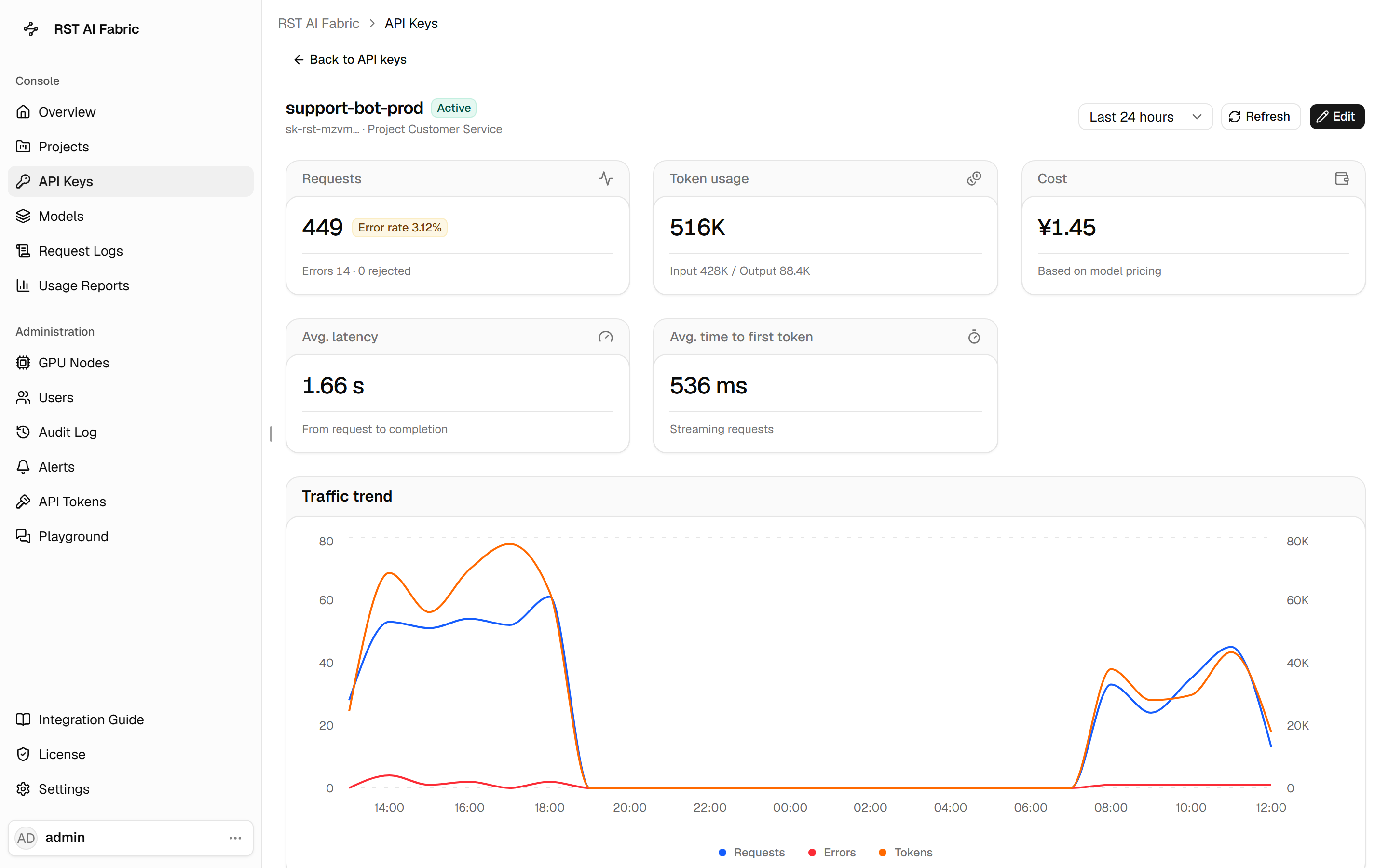
Select a key name to open its detail page: call trends, model breakdown, use of limits, budgets and quotas, and the latest 10 requests. Select View request logs to open the request logs filtered to this key.
Projects
Project budgets, billing and conversation retention, members and project roles, top-ups, adjustments and balance transactions for prepaid projects, and monthly statements.
Integration
Connection parameters, the console's Integration Guide page, calling the gateway with curl, Python and Node.js, connecting Claude Code and Codex to local models, reasoning models and request IDs.