

Playground
Administrators chat with a model directly in the console to check output quality and parameters; how these calls are logged and which limits apply.
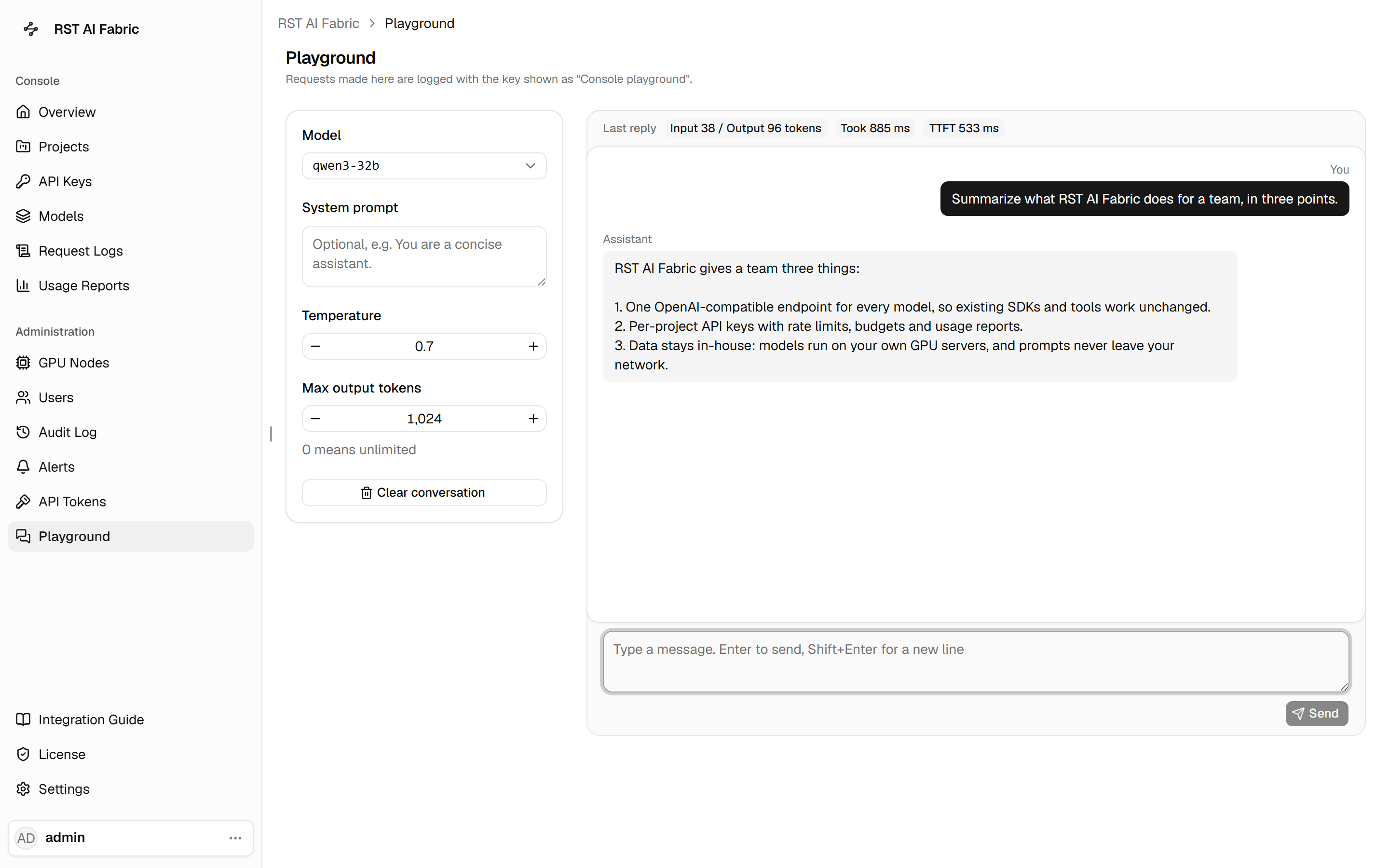
Playground lets administrators pick a model and chat with it in the console, to check output quality and parameter settings without creating an API key. It is for administrators only and needs a valid licence.
Use
- Open Playground in the Administration group.
- Choose a model; only enabled models are listed.
- Optionally enter a System prompt and adjust Temperature and Max output tokens (0 means no limit).
- Type a message; Enter sends it and Shift+Enter adds a line. The reply streams in; select Stop to interrupt it.
- Select Clear conversation to start again.
Below the latest reply you see input and output tokens, duration and time to first token. Errors that occur mid-stream also appear in the conversation.
Metering and limits
- Calls appear in the request logs under Console playground, belong to the default project and count in usage reports.
- Key rate limits, budgets and quotas do not apply, but the model concurrency limit does.
- Content safety and personal information masking apply as usual.
Usage reports
Requests, tokens and cost by project, key, model or date, date ranges and CSV export, and the value report that estimates savings against cloud reference prices.
GPU nodes
Online status and GPU metrics of GPU servers, adding and deleting nodes, trends, GPUs, host and served models on the node detail page, and remote vLLM deployment registered as model upstreams.