

Models
Adding models and upstreams, provider types and cloud models, aliases, fallback models, long-context routing, concurrency limits and priority, prices and reference prices, connection tests and the model detail page.
The Models page lists every model. The columns are public name, inference backend (internal forwarding), status, concurrency limit, price (CNY per million tokens) and creation date; aliases and upstream health appear inside the relevant cells. Administrators and read-only users can view the page; only administrators can add, edit, enable, disable and delete models. Project members cannot see it.
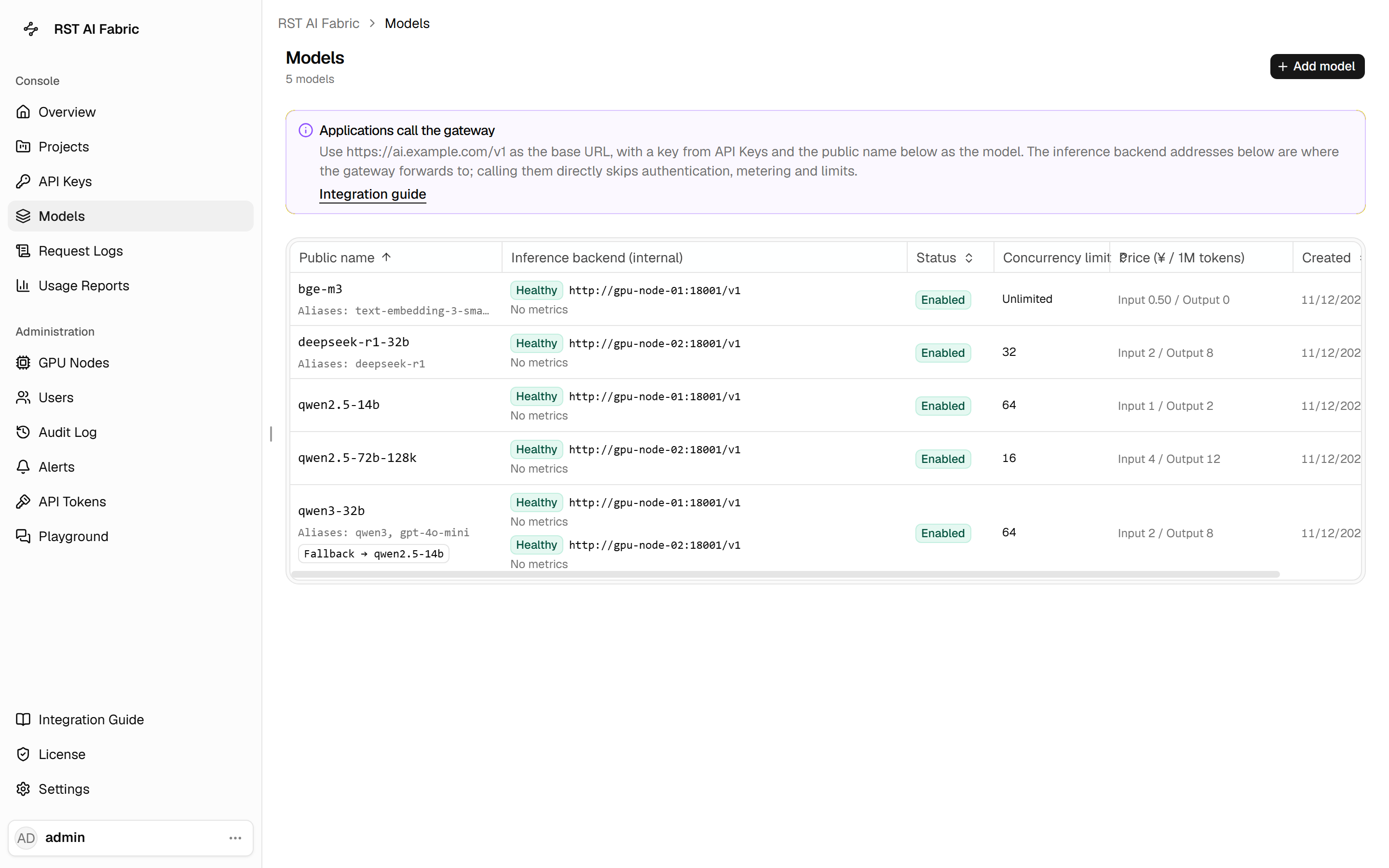
The top of the page shows the gateway URL that applications should call. Addresses in the "Inference backend (internal)" column are for the gateway's own forwarding; calling them directly bypasses authentication, metering and rate limits.
Add a model
Prerequisites
- The administrator role and a valid licence.
- A running inference server that the gateway host can reach.
Steps
- Select Add model.
- Enter the Public name: the value clients send as
model, for exampleqwen3-32b. - Choose the Provider and fill in Upstreams, as described below.
- Optionally expand Advanced options and set prices, aliases, fallback models, context length, long-context redirect, the model concurrency limit, priority pass-through and the comparable cloud service, then save.
- Select Test connection and check each upstream.
Providers
| Provider | Upstream URL | Upstream model name |
|---|---|---|
| OpenAI-compatible / vLLM | vLLM, SGLang, Ollama, OpenAI or any OpenAI-compatible API, ending in /v1, for example http://10.0.0.5:8000/v1 | vLLM's --served-model-name |
| Azure OpenAI | Deployment URL https://{resource}.openai.azure.com/openai/deployments/{deployment}, optionally with ?api-version= (default 2024-10-21) | The deployment's model, for example gpt-4o |
| Anthropic Claude | The official Claude Messages API | For example claude-sonnet-4-5 |
| Google Gemini | The Gemini API | For example gemini-2.5-flash |
| DeepSeek, Qwen (DashScope), Zhipu GLM | Presets that fill in each vendor's OpenAI-compatible URL, saved as OpenAI-compatible | For example deepseek-chat, qwen-plus, glm-4.6 |
Clients can always call in OpenAI format; for Anthropic, Gemini and Azure upstreams the gateway translates requests and responses. Anthropic and Gemini upstreams serve the chat endpoints (Chat Completions, Responses, Anthropic Messages) but not embeddings, rerank or score; Azure upstreams do not serve rerank or score. Calling an unsupported endpoint returns 400 unsupported_endpoint.
Upstreams
One row per inference server:
| Field | Description |
|---|---|
| Upstream URL | Starts with http:// or https:// |
| Upstream model name | The model name the upstream knows |
| Upstream API key | Leave empty if vLLM runs without --api-key; for cloud models, the key from the vendor's console. When editing, leave it empty to keep the current value |
| Weight | 1 or more; used to split traffic when load is equal |
| Enable this upstream | Disabled upstreams receive no requests |
Add a row per server when several servers host the same model; the gateway spreads requests by live load and fails over, see Multiple nodes. An upstream that fails to connect is skipped for 30 seconds. After changing an upstream URL you must enter its API key again.
Routing and concurrency
| Field | Description |
|---|---|
| Aliases | Other names clients can use for this model, for example gpt-4o-mini, so existing applications use a local model without code changes. Aliases are unique across all model names and aliases |
| Fallback models | Tried in order when this model's queue times out, all its upstreams are unavailable or answer 5xx; up to 5 |
| Context length | In tokens; 0 means unknown. Test connection shows vLLM's max_model_len |
| When too long, use | The model used when estimated input plus output exceeds the context length, or the upstream reports a context-length error |
| Model concurrency limit | Requests all upstreams handle at once; 0 means unlimited. At capacity, requests queue by key priority and get 429 model_busy after the queue timeout (30 seconds by default) |
| Forward priority | Passes the key's priority to vLLM. The upstream vLLM must run with --scheduling-policy priority, otherwise requests fail |
| Enabled | When disabled, clients cannot call this model name |
When a request falls back or is rerouted for length, the request log detail shows the original model and the reason.
Prices
| Field | Description |
|---|---|
| Input price, Output price | CNY per million tokens, for internal chargeback: request log cost, usage reports, project statements and prepaid charges |
| Comparable cloud service, Reference input price, Reference output price | Under Advanced options, the name and public price (CNY per million tokens) of a cloud service with similar capability. Used by the value report to estimate savings; does not affect billing |
Test connection
Test connection probes each upstream and shows whether it is reachable, its latency and its context length.
Model detail
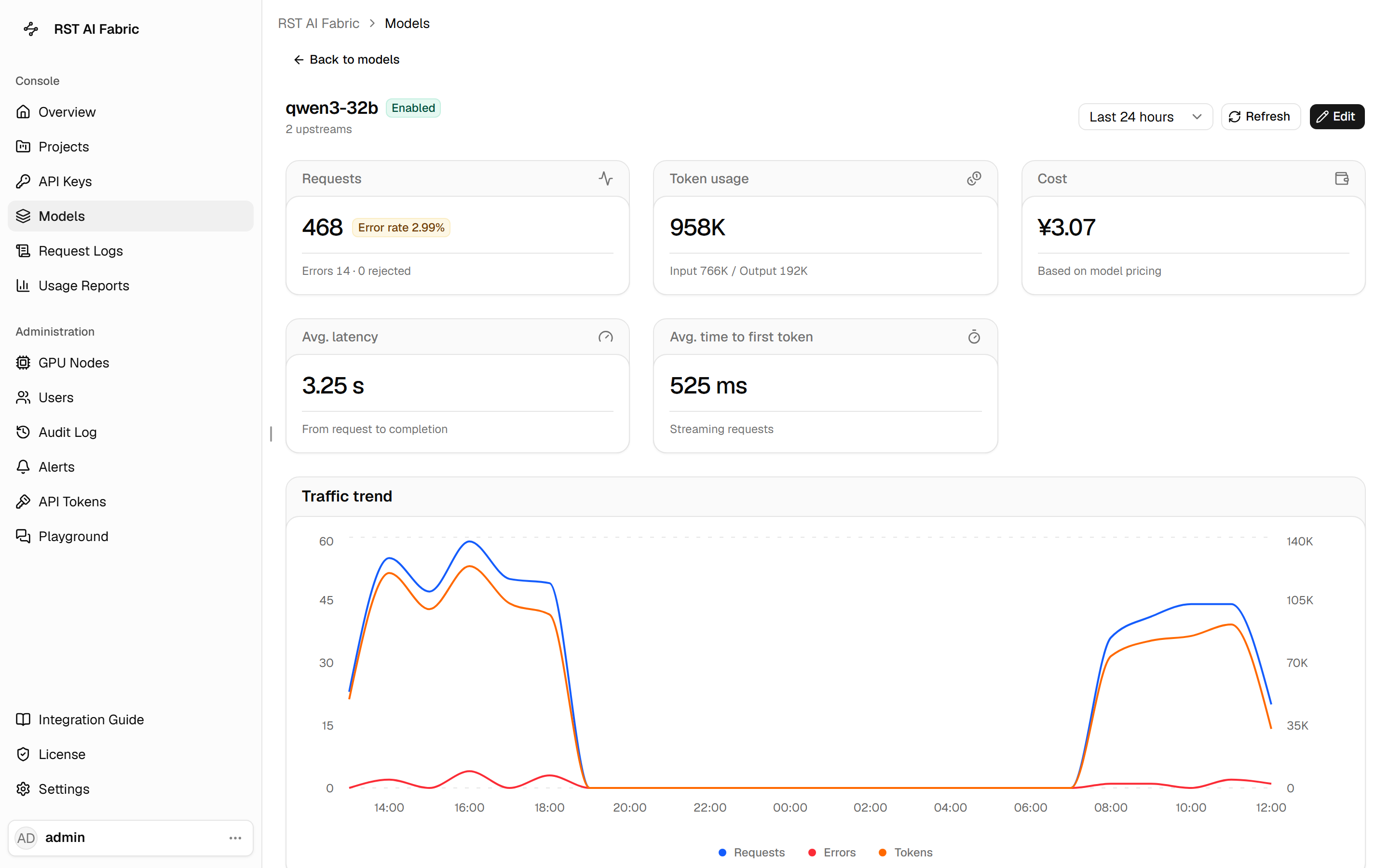
Select a model name to open its detail page: call trends, each upstream's health and live load (running requests, waiting requests, KV cache usage, collected every 3 seconds), key rankings and recent requests. Recent requests include calls made through aliases.
Licence and inference nodes
The licence sets an inference node limit. The node count is the number of distinct host:port pairs across the enabled upstreams of all enabled models. If saving a model would exceed the limit, the save fails with the allowed and required counts. Without a valid licence you cannot add models.
Console tour
Signing in to the console, the sidebar groups and pages, the three roles and their permissions, personal settings, language and theme, and the notice shown without a licence.
Projects
Project budgets, billing and conversation retention, members and project roles, top-ups, adjustments and balance transactions for prepaid projects, and monthly statements.