

Integration
Connection parameters, the console's Integration Guide page, calling the gateway with curl, Python and Node.js, connecting Claude Code and Codex to local models, reasoning models and request IDs.
A caller needs three values, provided by an administrator or project owner:
| Parameter | Value |
|---|---|
base_url | http://<gateway>:8080/v1, or https://<domain>/v1 once HTTPS is set up. Copy it from Gateway URL under Settings > Personal |
api_key | A key created on the API Keys page, starting with sk-rst- |
model | The model's public name or an alias. GET /v1/models lists the models the key may use |
Endpoints, headers and behaviour are described in the API reference.
Integration Guide page
The console's Integration Guide page builds call examples for the current gateway URL, with cURL, Python, Node.js and Anthropic / Claude Code tabs. Pick a model and the examples use its name, ready to copy for developers. The page also lists the error codes and offers Download OpenAPI spec for the console management API.
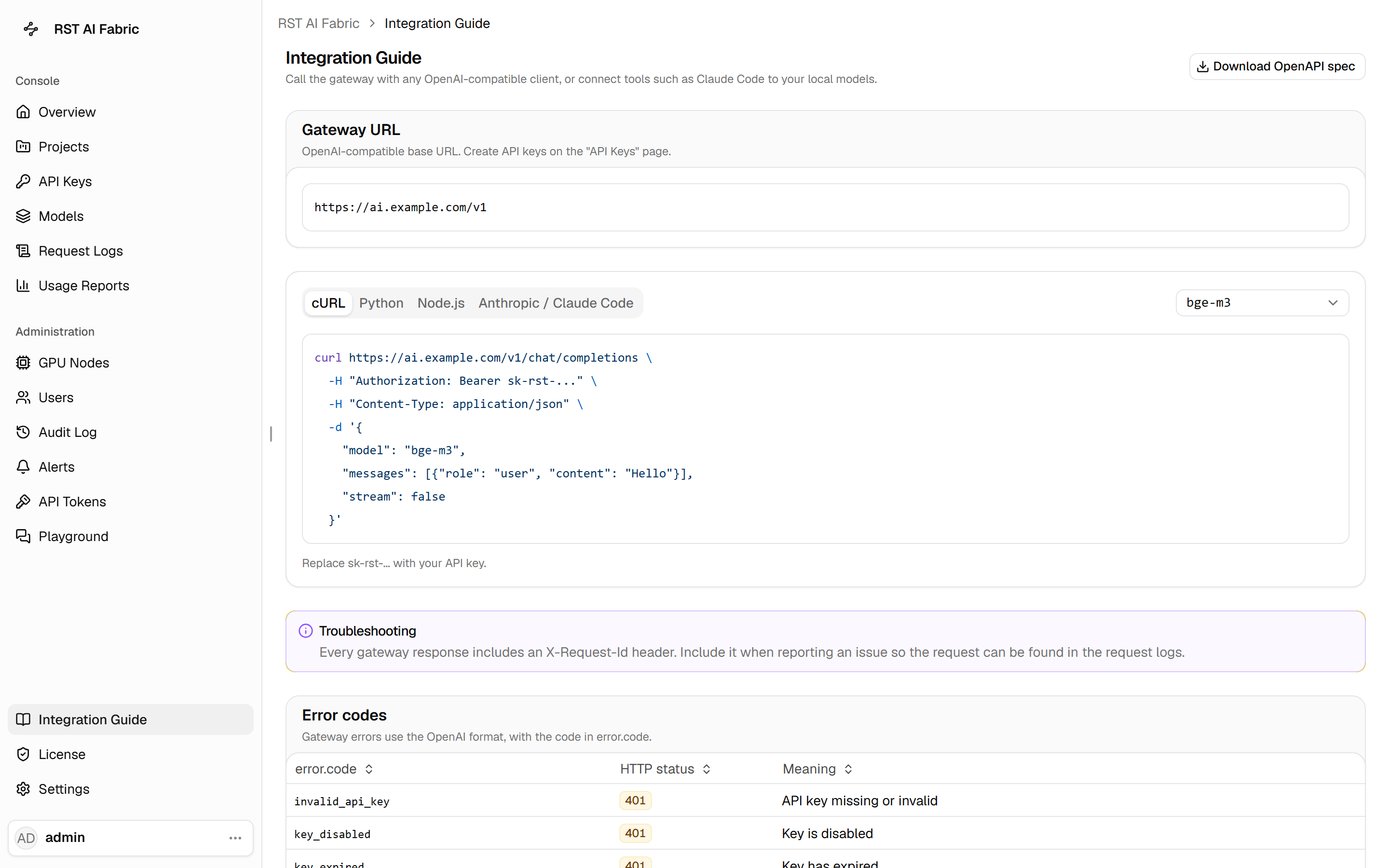
cURL
curl http://<gateway>:8080/v1/chat/completions \
  -H "Authorization: Bearer sk-rst-..." \
  -H "Content-Type: application/json" \
  -d '{"model": "qwen3-32b", "stream": true,
       "messages": [{"role": "user", "content": "Hello"}]}'
Python
pip install openaifrom openai import OpenAI
client = OpenAI(base_url="http://<gateway>:8080/v1", api_key="sk-rst-...")
resp = client.chat.completions.create(
model="qwen3-32b",
messages=[{"role": "user", "content": "Hello"}],
)
print(resp.choices[0].message.content)Node.js
npm install openaiimport OpenAI from "openai"
const client = new OpenAI({ baseURL: "http://<gateway>:8080/v1", apiKey: "sk-rst-..." })
const resp = await client.chat.completions.create({
model: "qwen3-32b",
messages: [{ role: "user", content: "Hello" }],
})
console.log(resp.choices[0].message.content)Streaming, tool calls and vLLM's extra parameters work as they do against vLLM directly.
Claude Code
The gateway provides an Anthropic Messages-compatible endpoint, /v1/messages. Set these environment variables and run claude to use the gateway's models, including local models served by vLLM:
export ANTHROPIC_BASE_URL="http://<gateway>:8080"
export ANTHROPIC_AUTH_TOKEN="sk-rst-..."
export ANTHROPIC_MODEL="qwen3-32b"

claude
ANTHROPIC_BASE_URL has no /v1. For OpenAI-compatible upstreams the gateway converts Anthropic requests to OpenAI format and merges all system content, in order, into one leading system message, which suits chat templates that accept a system message only at the start.
Codex and the Responses API
/v1/responses is compatible with the OpenAI Responses API, so clients such as the Codex CLI can connect. Set the client's API format to OpenAI Responses and its base URL to the gateway's /v1 address. The gateway handles Codex's namespaced MCP tools and custom-format tools such as apply_patch.
The gateway does not store conversations, so the client must send the whole conversation with every request; see the API reference. When connecting Codex to a local model, turn off features the model does not use (such as features.memories, features.apps and features.multi_agent) in the Codex configuration to keep prompts short.
Reasoning models
The reasoning output of models such as Qwen3 and DeepSeek-R1 is returned as vLLM produces it. For Qwen3, add "chat_template_kwargs": {"enable_thinking": false} to the request to turn reasoning off.
Request IDs
Every gateway response carries an X-Request-Id header. Quote it when reporting a problem so an administrator can find the call in the request logs. When a call fails, check error.code in the response; see Error codes.
API Keys
Creating API keys and the limits you can set, groups and notes, viewing and regenerating keys, enabling, disabling, deleting and bulk actions, moving a key to another project, and the key detail page.
API reference
Authentication for the gateway's client endpoints, request and response headers, what each endpoint does and its limits, streaming and usage accounting, model name resolution, and the error format.