

Rule copilot
Describe a behavior in plain language and get a QRadar Rule Wizard rule design with tests, rule response, back-test AQL and MITRE ATT&CK, checked against live rules for duplicates. The analyst builds the rule in the wizard. A paid feature.
The Rule copilot turns a detection intent into a Rule Wizard rule design. The QRadar REST API cannot create custom rules, so the output is a design for the analyst to follow: the tests to add in order, the rule response to configure, and a back-test AQL that checks the logic against historical data. The gateway never creates or enables a QRadar rule. Rule designs follow your interface language.
The model's context includes the Ariel fields, the log-source catalog, related rule names from the Console (to flag duplicates) and the building-block list (to reference existing BB: definitions).
Generate a rule design
Prerequisites
- A Professional or Enterprise license, including a trial.
Steps
- Under Detection intent, state the trigger, the time window and the exclusions, for example "the same source IP fails authentication for different accounts 5+ times in 5 minutes, excluding scanners". You can also start from one of the Examples.
- Select the Rule type: auto, event, flow, common or offense. With auto, the model picks from the intent: event for event fields, flow for traffic direction and bytes, common when both are needed, offense for properties of existing offenses.
- Select Generate rule design.
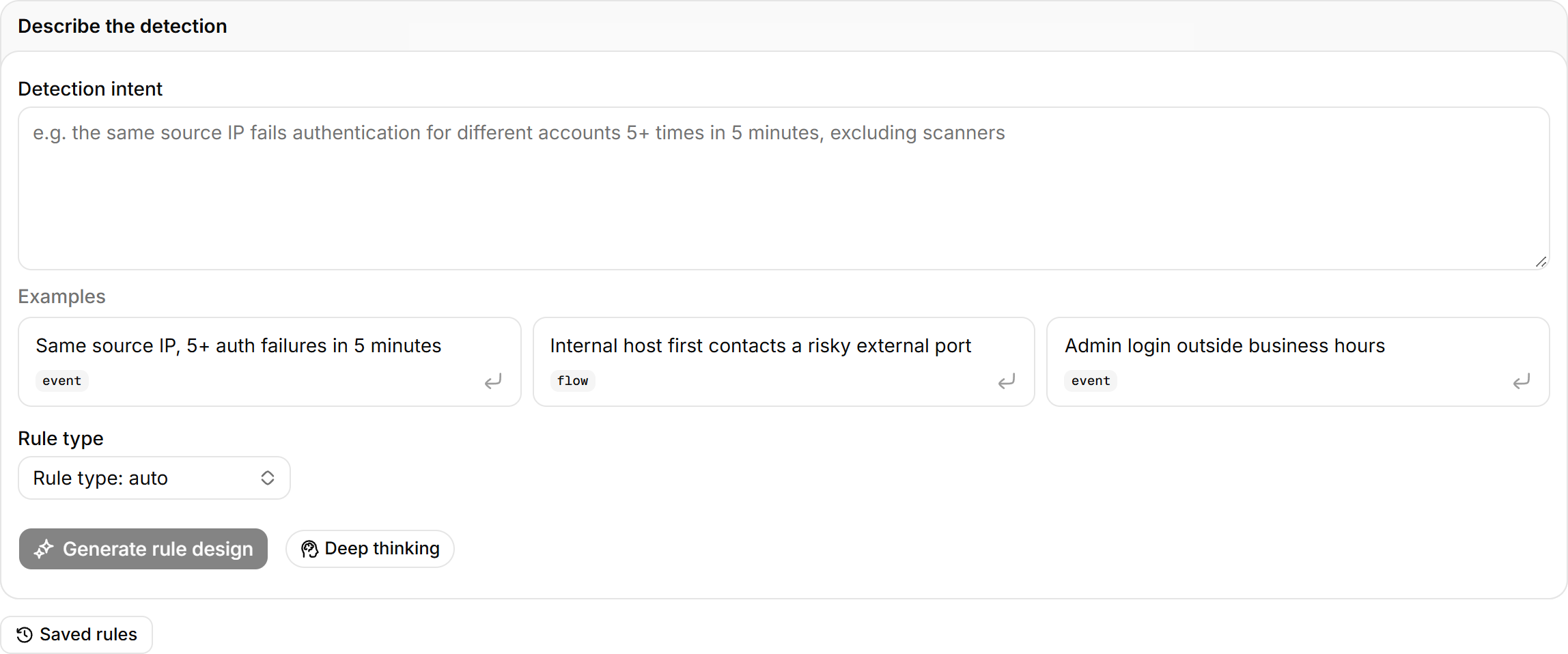
When you select Make a detection rule in an offense investigation report, the intent is filled in from the investigation. If the intent is too vague, the page shows The model declined and suggests adding trigger conditions, a time window and fields.
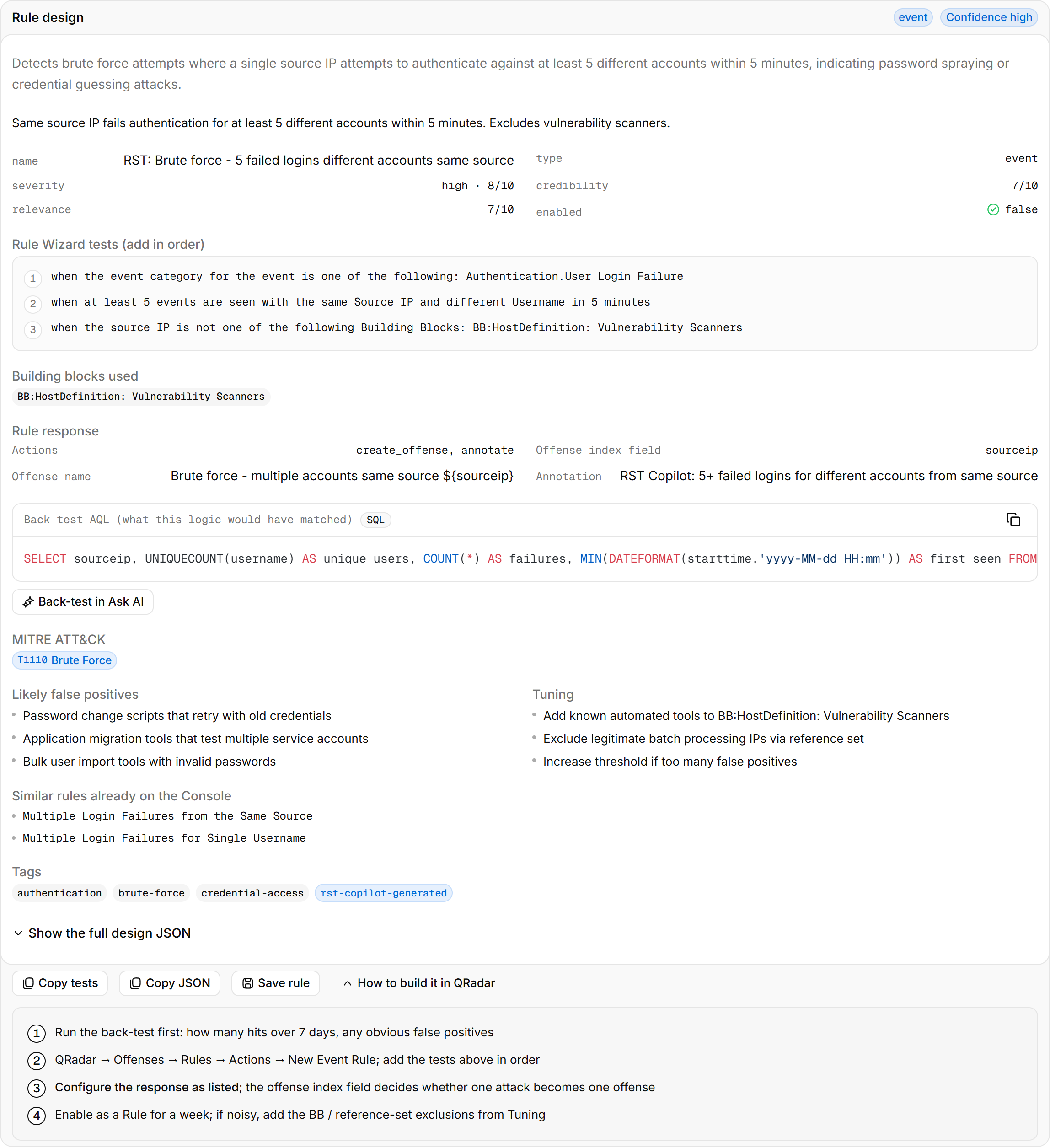
Build the rule in QRadar
Steps
- Below the design, select Back-test in Ask AI to see the hits and obvious false positives of the last 7 days in Ask AI.
- In QRadar, open Offenses > Rules > Actions > New Event Rule (or the rule type that matches), and add the tests under Rule Wizard tests (add in order) one by one with the given parameters.
- Configure the response as listed under Rule response.
- Enable it as a Rule and watch it for a week. If it is noisy, add the building blocks or reference-set exclusions listed under Tuning.
Select How to build it in QRadar to see the same steps on the page. Copy tests and Copy JSON carry the content into the wizard or a ticket.
The Offense index field decides whether one attack becomes one offense. The wrong field splits one attack into several offenses, or merges different attacks into one.
The back-test AQL only shows what these conditions match in historical events. It cannot verify how the Rule Wizard's counting windows and function tests behave. Run a test in the wizard before going live.
Save to the rule library
Select Save rule to store the design in the team rule library, visible to the whole team. Saved rules on the page lists the library; you can load a design back or delete it.
Rule design contents
| Section | Content |
|---|---|
| Confidence | The model's own rating of how well the design covers the intent |
| Tags | Rule type, MITRE ATT&CK technique IDs and tactics |
| Rule Wizard tests (add in order) | Test statements in the wizard's wording, such as when the event(s) were detected by one or more of these log sources, with parameters filled in |
| Building blocks used | Existing BB: definitions referenced, to select directly in the wizard |
| Rule response | Actions, Offense index field, Offense name, Annotation, Add to reference set, and the severity, credibility and relevance dials |
| Back-test AQL | A SELECT … FROM events statement showing what the logic matches in historical data |
| Likely false positives | Normal activity that would trigger the rule |
| Tuning | Building blocks, reference-set exclusions and threshold changes to add |
| Similar rules already on the Console | Live rules with similar names; duplicates are flagged |
Triage
Clusters a batch of offenses by rule and source; the model rates each cluster, judges false positives and recommends an action, and the clusters are queued by priority. A paid feature.
Security posture
Offense and high-severity counts in a time window, log-source and platform problems, the alert timeline, the noisiest rules and the latest alerts.