

Triage
Clusters a batch of offenses by rule and source; the model rates each cluster, judges false positives and recommends an action, and the clusters are queued by priority. A paid feature.
Triage decides the order in which the offense queue gets worked. Offenses with the same rule and source are first clustered locally; the model then rates each cluster's severity, judges whether it is a false positive and recommends an action, and the clusters are ranked by priority. A few hundred offenses usually come down to a dozen or so decisions. The ratings follow your interface language.

Each run is archived in Investigations. Cluster dispositions are shared by the team; they are not written back to QRadar and do not change dispositions in Offenses. To close an offense in QRadar, use its details in Offenses.
Triage OPEN offenses
Prerequisites
- A Professional or Enterprise license, including a trial. Without one, the page points to License.
- Offense sync is on; see Offenses. If the gateway holds no offense copies, it pulls them from QRadar directly.
Steps
- Under Submit alerts, enter the Time window (minutes); the default is 1440. Offenses that are OPEN and started within this window are taken.
- (Optional) Change Maximum alerts (100 by default) and Maximum clusters sent to the model (30 by default).
- (Optional) Turn on Deep thinking to have the model rate with more reasoning.
- Select Start triage.
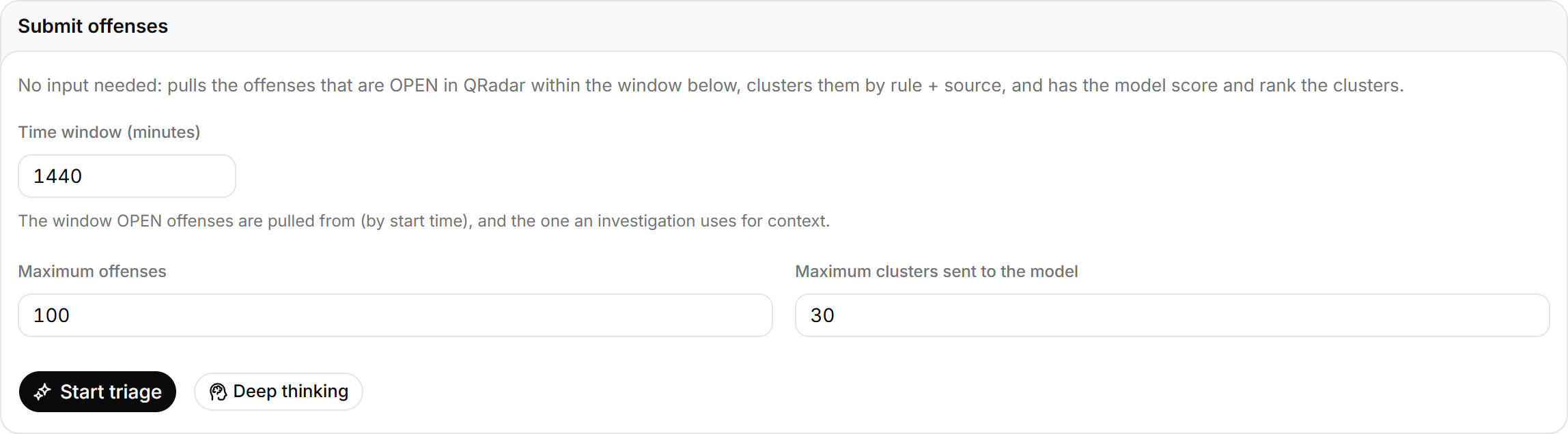
Above Maximum alerts, only the newest offenses are taken. Clusters over the cluster cap are not rated; a note above the results gives the count, and you can raise the cap and submit again. A few dozen clusters usually take 1 to 3 minutes on a reasoning model.
You can also send offenses here from other pages: select Send to triage on a result in Ask AI or in an offense's details in Offenses. The top of the page shows Received N alerts, and the time window is then used only for investigation context.
Act on the triage result
Steps
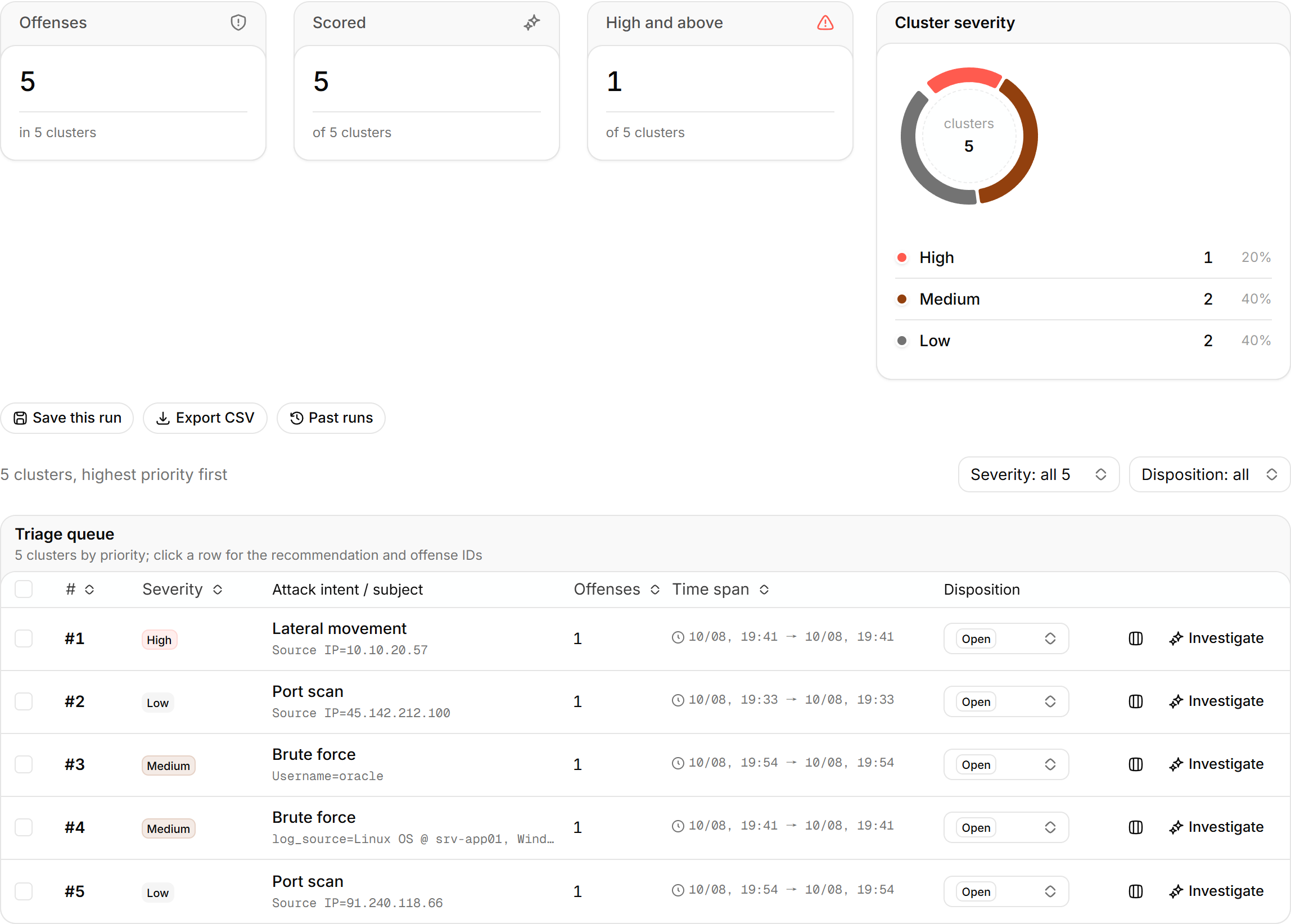
- In the Triage queue, select a row to see the Recommendation and the cluster's alert IDs.
- Set its Disposition. To change several rows at once, select them first.
- To look closer, select Investigate to run an offense investigation around the cluster's subject.
- If several clusters might be one incident, select Compare on each and review them under Side-by-side comparison at the bottom.
When you set a disposition to escalated, the page asks whether to push it to the on-call channel. Destinations are configured in Outbound channels.
Save and export
Select Save this run and optionally add a note. Saved runs appear under Past runs for the whole team. Select Export CSV to export the current queue.
Triage result contents
The top shows Alerts (with the number of clusters), Scored, High and above, and the Cluster severity mix. Each queue row is one cluster:
| Column | Meaning |
|---|---|
| Severity | Severity rated by the model. Likely false positives are marked Likely false positive |
| Attack intent / subject | What the cluster does, and the source IP, destination host or account involved |
| Alerts | Offenses in the cluster |
| Time span | From the first to the last offense in the cluster |
| Disposition | Open, handled, false positive or escalated |
When scoring does not finish
If the model times out or fails, the page says Scoring did not complete and orders the queue by alert count only, with no severity or recommendation; you can submit again later. A reasoning model can exceed LLM_TIMEOUT_S (180 seconds by default) on one scoring call. If it keeps happening, raise that value or lower the reasoning effort in AI settings.
Offenses
Sync offenses from QRadar with an AI summary for each. Filter and act on them in the alert feed, write notes, closes and assignments back to QRadar, and investigate a single offense.
Rule copilot
Describe a behavior in plain language and get a QRadar Rule Wizard rule design with tests, rule response, back-test AQL and MITRE ATT&CK, checked against live rules for duplicates. The analyst builds the rule in the wizard. A paid feature.