

Install
Install the .spl from Splunk Web or the CLI; push through the deployer on a search-head cluster; verify the engine; uninstall.
This page covers downloading the package, installation on a single search head and on a search-head cluster, plus removal. Splunk Cloud is not supported yet.
Download
Packages are published on the GitHub Releases page. Each version has three packages, each with a .sha256 checksum file:
| File | For |
|---|---|
RST-AI-Copilot-for-Splunk-<version>-selfcontained.spl | On-prem Splunk Enterprise (Linux x86_64 only; the agentic engine needs 10.2 or later) |
RST-AI-Copilot-for-Splunk-<version>-fallback.spl | Splunk Enterprise where the selfcontained package cannot be used: Windows or ARM (aarch64) hosts, or environments that do not allow compiled components |
RST-AI-Copilot-for-Splunk-<version>-splunkbase.spl | For distribution through Splunkbase; updated through Apps > Manage Apps. Same as the fallback package, with the in-app update off by default |
See Requirements for the differences between them. Community, Professional and Enterprise share one package: without a licence it runs the free Community edition, and activating a licence unlocks that edition's features without reinstalling.
Verify the download:
# Linux: keep the .spl and the .sha256 in the same directory
sha256sum -c RST-AI-Copilot-for-Splunk-<version>-selfcontained.spl.sha256
# Windows: compare the printed Hash with the value in the .sha256 file
Get-FileHash RST-AI-Copilot-for-Splunk-<version>-selfcontained.spl -Algorithm SHA256Single search head
Install the package
Splunk Web: under Apps, Manage Apps, choose Install app from file, pick the .spl, upload and restart.
CLI:
$SPLUNK_HOME/bin/splunk install app RST-AI-Copilot-for-Splunk-<version>-selfcontained.spl -auth admin:<password>
$SPLUNK_HOME/bin/splunk restart
Alternatively unpack into $SPLUNK_HOME/etc/apps/ and restart. The app directory is always rst_splunk_ai_copilot.
Verify
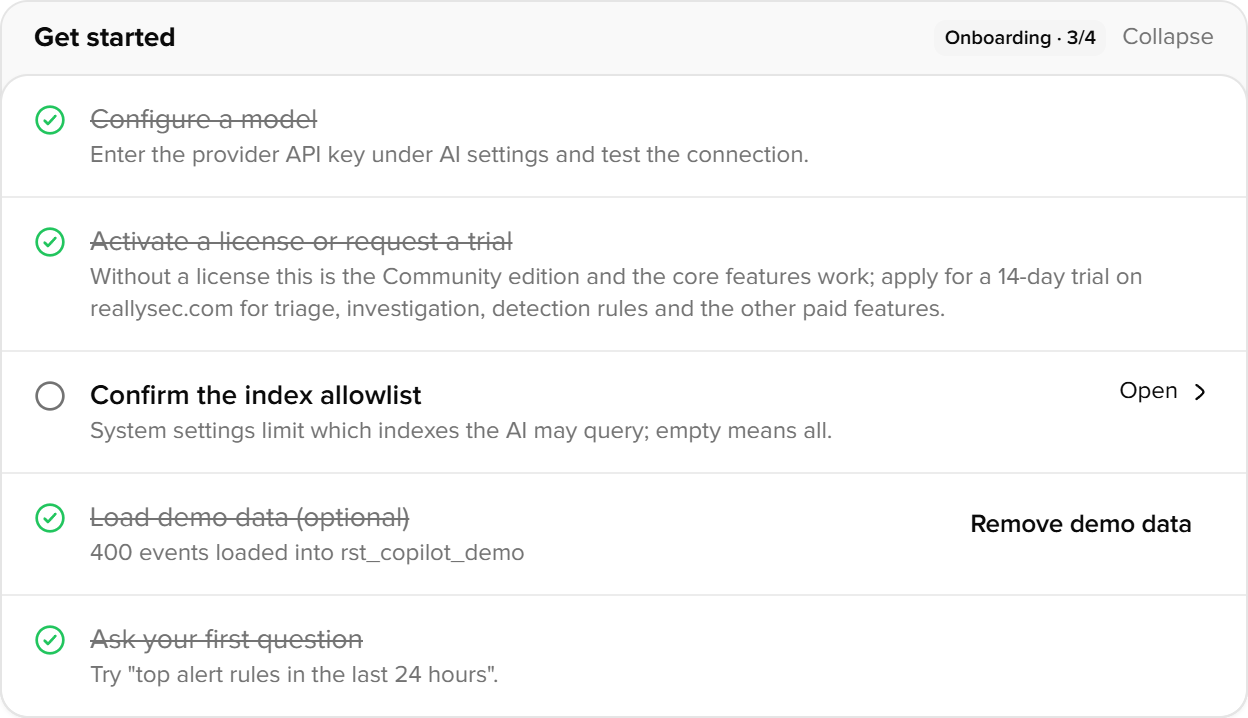
Open the app after the restart. The empty home page shows a five-item checklist: configure the LLM, activate a licence, confirm the index allow-list, load demo data (optional), ask a first question. Once all are done it collapses to one line.
The Engine card on AI settings under Settings states whether the agentic or the requests engine is running, and why, if it fell back.
Search-head cluster
Unpack the .spl into $SPLUNK_HOME/etc/shcluster/apps/rst_splunk_ai_copilot/ on the deployer and run splunk apply shcluster-bundle.
After pushing a new version, members may not do a rolling restart on their own, and splunkd keeps reusing its running Python handler processes, so members can go on running the old code. Run splunk rolling-restart shcluster-members, or restart each member, after the push. Files that an earlier version shipped and the new one dropped stay in the app directory on the members; they are not loaded.
| Item | Behaviour in a cluster |
|---|---|
local/copilot.conf | Not replicated between members. Configure each member through the UI, or ship local/ in the deployer bundle |
| LLM and embeddings API keys | Replicated automatically. The keys live in storage/passwords, which the cluster replicates to every member |
| Licence | Install an online licence once on any member; each member then activates as its own node with its own fingerprint. Offline licences: one per member. The enterprise licence has no node limit. See Settings > License |
| KV store | Replicates within the cluster, so conversations, knowledge base and triage results are the same on every member |
Splunk Cloud
Splunk Cloud is not supported yet. The app's online update downloads and extracts a new .spl and restarts Splunk, which would not pass Splunk Cloud vetting, and there is no Cloud build.
Uninstall
$SPLUNK_HOME/bin/splunk remove app rst_splunk_ai_copilot -auth admin:<password>KV store collections (copilot_*) and credentials in storage/passwords are not removed with the app. For a clean removal, deactivate the licence first on Settings > License (returns the online seat to the server), then drop the collections.